
Shopify ERP Integration: Webhooks, Retries, Reconciliation
Shopify ERP Integration guide: data ownership, webhooks vs batch sync, idempotent retries, failed-event handling and reconciliation for Shopify Plus teams.

Published
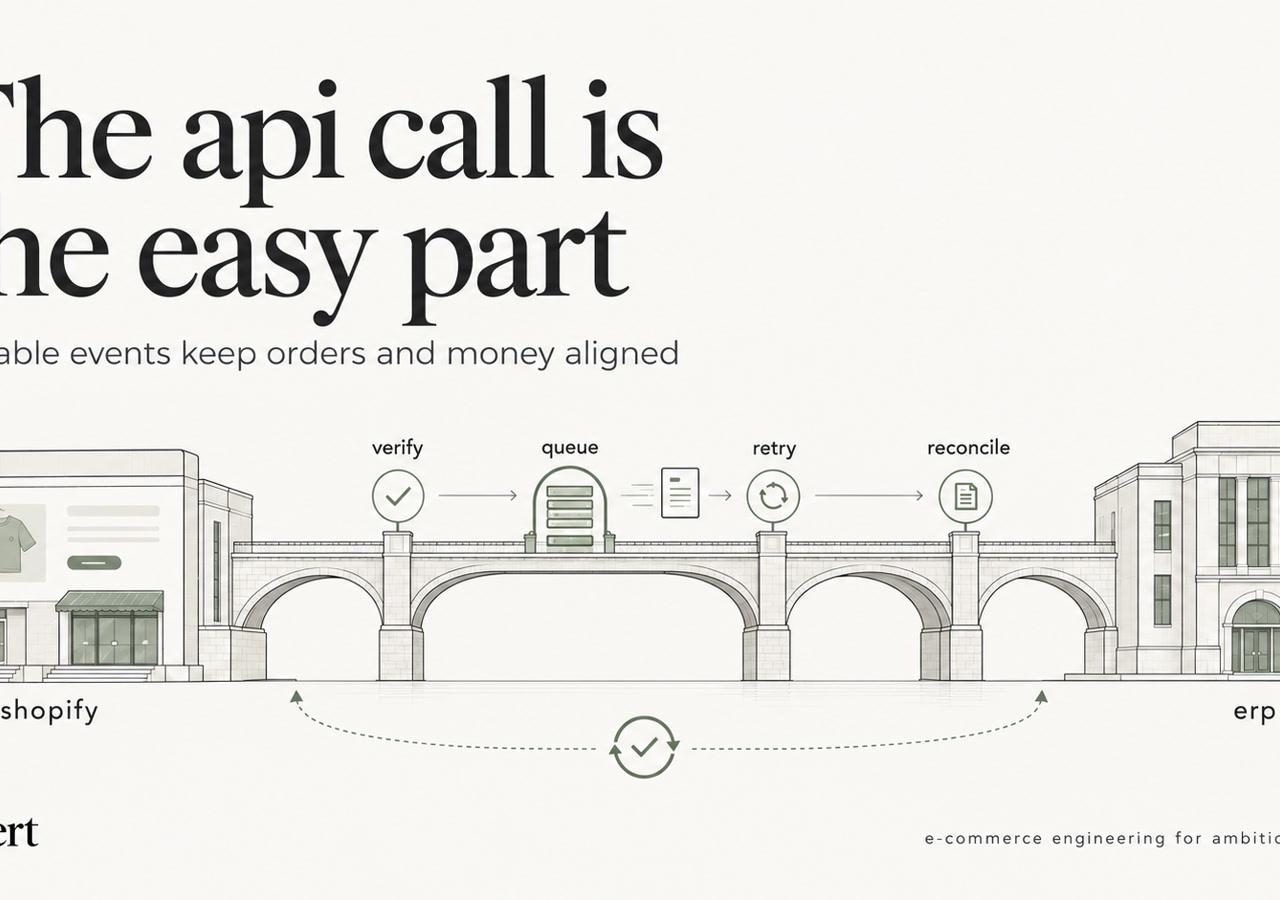
An order sits in Shopify. The warehouse never sees it. Finance finds the gap at month-end close, after the customer has already asked where the package is.
That gap is what a thin connector leaves behind. Checkout succeeded. Nothing durable held the event while the ERP was briefly down. Nobody compared the two systems until the books would not close.
Established DTC and B2B brands on Shopify or Shopify Plus, including teams leaving Magento or WooCommerce, need a different starting point. Ownership, recovery, and verification decide whether orders, stock, and money stay aligned. The API calls are the easy part.
Why Shopify ERP Integration Is an Architecture Problem
A production Shopify ERP integration is a set of data contracts, not a one-way order export. Those contracts cover customer records, orders and order updates, products and variants, SKUs, pricing, taxes, discounts, inventory, fulfillments, refunds, returns, payment status, and financial records.
Shopify's B2B external integrations guidance describes a bidirectional model that can synchronize customer records, orders and order updates, inventory, product catalogs, pricing, payment terms, payment status, fulfillments, refunds, cancellations, historical orders, and payouts. Scope differs by ERP. That documentation identifies NetSuite, Microsoft Dynamics 365 Business Central, and Acumatica as systems that can exchange several of those domains with Shopify.
The same guidance splits prebuilt connections from custom APIs. Prebuilt connections cut effort when workflows are standard. Custom APIs fit unique catalogs, pricing rules, payment terms, or legacy processes, and they cost more engineering and ongoing maintenance.
Practical rule: Decide which system owns each object, and how updates move both ways, before any storefront migration work starts.
The hard questions come before an endpoint is called. Which system owns each domain? How do changes move? What happens when an event fails? How are mismatches found and corrected? Ownership, data contracts, retries, observability, and reconciliation separate a durable design from two APIs that happen to be connected. Teams that want that design scoped and kept running can start with Shopify integration services.
Leave with three outputs: an ownership map, an architecture choice, and a failure-handling design.
Assign a System of Record to Each Data Domain
Every domain needs one system of record. Write it down before development. A shared field with two writers will be overwritten, and the later write usually wins for the wrong reason.
| Data domain | System of record | Primary direction | Latency need |
|---|---|---|---|
| Products and variants | Shopify for merchandising and content; ERP for item master | ERP to Shopify for master data; Shopify to ERP for content | Hourly to daily |
| SKUs and identifiers | ERP | ERP to Shopify | On change, validated before publish |
| Pricing | ERP for cost and B2B price lists; Shopify for storefront display | ERP to Shopify | Scheduled or on change |
| Inventory | ERP (available-to-sell quantity) | ERP to Shopify | Near real time |
| Customers | Shopify for online accounts; ERP for account terms and credit | Two-way with stored mapping | Near real time for new records |
| Orders | Shopify for order creation; ERP for sales order and ledger | Shopify to ERP | Near real time |
| Taxes | Shopify at checkout; ERP for filing and reporting | Shopify to ERP | At order creation |
| Discounts | Shopify for checkout application; ERP for promotional rules | Shopify to ERP | At order creation |
| Fulfillment | ERP or 3PL warehouse system | ERP to Shopify | Near real time |
| Refunds and returns | Shopify for refund event; ERP for return receipt and credit memo | Two-way | Near real time |
| Financial records and payouts | ERP | Shopify to ERP | Daily batch |
The usual split is commercial, not technical. The ERP owns cost, available-to-sell inventory, accounting, business-specific and B2B pricing, and purchasing or fulfillment logic. Shopify owns merchandising, storefront content, customer-facing product presentation, checkout events, and online order creation. That split changes by merchant. A wholesale brand may keep price lists entirely in the ERP. A DTC brand may let Shopify own promotional display while the ERP still owns cost. Lock the choice before anyone maps a field.
Schemas almost never line up
Ownership does not finish the design. Schema mapping still has to turn one shape into the other.
- Variants versus items: A Shopify product with several variants may map to multiple ERP item records, depending on the ERP schema; cost and inventory ownership must be mapped at the correct variant/item level.
- Locations versus warehouses: Map Shopify locations to ERP warehouses with stable IDs. Names get renamed.
- Sellable quantity: Define available-to-sell from the ERP/WMS calculation, incorporating reservations, commitments, safety stock and location-specific rules where applicable. Do not assume every ERP uses the same arithmetic. Inventory publication should have its own field-level contract and reconciliation tests. For a related implementation discussion, see Shopify inventory sync.
- Metafields: Give each metafield an explicit type before it becomes an ERP custom field. Metaobjects need the same contract.
- Discounts: A checkout discount often has no matching ERP promotion. Send the applied amount and reason, not a hope that rule codes match.
- Order lines: The ERP line usually needs item, unit of measure, and tax class, not only SKU and quantity.
SKU quality is the join. A renamed, reused, or duplicated SKU breaks orders, inventory, and price books at once. Publish only after the ERP identifier is stable on both sides.
Choosing Between Direct, Middleware, iPaaS and Custom Architectures
The architecture choice is really one question. Where will transformation, retries, and logging live?
Direct Shopify to ERP fits one store, one ERP, a few domains, and standard fields. It fails quietly when retries, logs, and field rules slide into ERP scripts that nobody watches. A timeout then looks like a successful night.
Middleware is justified when the flow needs transformation, orchestration, a durable queue, structured logging, retry policy, several downstream systems, or rules that do not belong in either application. A growing brand with a 3PL and a finance export usually lands here.
iPaaS or a prebuilt connector is a good fit for standard order, inventory, and product flows. It gets restrictive when custom metafields, undocumented approval steps, or B2B price logic do not fit the connector's field model. Changes then wait on the vendor's release cycle.
A custom integration service fits when the business must own each workflow, its error handling, and its observability. That path needs engineering capacity. When the integration itself is an application, Shopify app development is the adjacent build, not a substitute for the ownership map.
Certified connectors cover a clean ERP API well. Years of custom fields, with several systems writing the same records, usually push the work toward middleware or custom code. Use one test. If the team cannot see, from one place, which record failed, why, and whether it is resolved, a bare connector will not be enough.
Selecting Webhooks, Batches or Hybrid Sync
A DTC brand with a 3PL and a finance export usually runs hybrid sync. Orders and inventory changes need timely processing, while financial settlement and some master-data updates can move hourly or daily. Sending every price-book edit in real time mostly creates noise. Choose the pattern by data domain, latency requirement, and the process for correcting missed or stale updates.
| Pattern | How it moves data | Main risk | Best workload |
|---|---|---|---|
| Webhooks | Shopify pushes topic events when records change | Duplicates, out-of-order delivery, missed events during downtime | Orders, fulfillments, inventory changes |
| Polling | Integration queries the API on a schedule for changes | Consumes rate budget; latency depends on interval | Systems without webhook coverage |
| Scheduled batch with Bulk Operations | Large asynchronous jobs run on a timetable | Stale data between runs | Initial load, full catalog, financial and reconciliation jobs |
| Event-driven with queue | Webhooks write to a durable queue; workers process events | Queue depth grows if workers fail | High-volume order and inventory flows |
| Hybrid | Webhooks detect change; batches correct drift and sync master data | Two paths to maintain and test | A DTC brand with a 3PL and a finance export |
Start on GraphQL, and budget the cost
Shopify's API limits documentation classifies the REST Admin API as legacy as of October 1, 2024, and states that new public apps created from April 1, 2025 must use the GraphQL Admin API exclusively. A new Shopify API ERP integration should start with GraphQL. Its limits are based on query cost, calculated from selected fields and their maximum possible cost, rather than a flat request count. Budget for that cost, request only needed fields, and paginate results.
Bulk Operations suit initial catalog loads, full reconciliations, and migration jobs better than a storm of synchronous calls. For day-to-day changes, keep the Shopify webhooks topic list short and send events through one central processor into a durable queue. The relevant objects include orders, products, variants, locations, inventory, fulfillments, metafields, and metaobjects.
With hybrid sync, webhooks feed changes into the queue while scheduled batches correct drift and refresh master data. Batches also move payouts. Assign ownership for both paths, including who investigates queue backlogs and stale batch results. The trade-off is clear: hybrid sync handles different latency needs, but adds a second path that must be maintained and tested. A Shopify ERP sync that pushes every price-book edit immediately spends processing capacity on changes that can wait.
Preventing Duplicate Orders and Recovering From Failures
Shopify webhooks can be delivered more than once, and a business operation can be retried even after the receiving ERP has committed it. These are two different problems. For transport-level deduplication, retain the X-Shopify-Webhook-Id delivery ID; for business-level idempotency, use a stable key such as shop ID + Shopify order ID + operation type. Enforce uniqueness in persistent storage and in the ERP external-reference field wherever supported. Before attempting to create a sales order after an ambiguous timeout, look up that external reference; if it exists, link the ERP ID instead of creating another order. A Shopify metafield can hold the ERP reference for visibility, but should not replace the integration's transactional idempotency store. See Shopify's webhook verification guidance.
A production event-processing pattern
A reliable HTTPS intake follows a bounded sequence:
- Read the raw request body, verify
X-Shopify-Hmac-SHA256against the app secret, and reject invalid signatures. Use a constant-time comparison. Shopify-managed app frameworks can handle this validation. - Record the delivery ID in a durable inbox with a uniqueness constraint. Commit the inbox record and an associated processing job before returning a successful HTTP response; a database-backed outbox or transactional queue can avoid the gap between those writes.
- Return quickly. Do not synchronously wait for the ERP; Shopify's HTTPS delivery has a five-second total timeout.
- Let a worker retrieve the latest authoritative Shopify fields when necessary, map the order to the ERP schema, and apply a business idempotency key to its write.
- Persist the ERP result, processing attempts, exception status, and correlation ID. Alert on exhausted retries and reconcile periodically against source records.
Illustrative flow: Shopify webhook → HMAC validation → durable inbox/queue → idempotent worker → ERP → reconciliation. A successful webhook acknowledgment proves the delivery was accepted for processing, not that the ERP operation has finished. Shopify's HTTPS delivery requirements and webhook architecture guidance explain the underlying delivery model.
Retry only what can succeed later
| Failure | Retry? | Response |
|---|---|---|
| Timeout or dropped connection | Yes | Retry with exponential backoff and jitter using the same idempotency key |
| HTTP 429 or Shopify throttling | Yes | Honor throttle signals and slow the queue consumer |
| ERP 5xx or temporary outage | Yes | Back off, cap attempts, pause the queue if the outage is broad |
| Invalid SKU, missing tax class, bad address | No | Move to failed-event queue for data correction, then replay |
| ERP business-rule rejection, such as a credit hold | No | Route to manual review with the reason attached |
| Duplicate found in ERP | No new write | Link the existing ERP identifier and reconcile |
For new integration work, prioritize GraphQL Admin API throttling rather than designing around the legacy REST request-per-second figures. GraphQL responses expose requested and actual query cost along with available throttle capacity; workers should use those signals to schedule queries. A throttled GraphQL query can return a throttling error, so handle errors in the response body rather than relying only on HTTP 429. See Shopify API rate limits. Shopify Plus still has API limits.
The dead-letter or failed-event queue stores the payload, the error class, and the attempt count. Cap retries. After the cap, stop and alert.
Blind retries make outages worse. They pile load onto an ERP that is already failing. A timed-out order write may have succeeded, so a naive second post creates a second sales order.
Timeouts and temporary API errors are candidates for bounded retries only after the write is made idempotent. Authentication failures, invalid data, and business-rule rejections require remediation rather than blind retries.
When an older event arrives late
Event ordering is a separate bug. An older inventory or order update can land after a newer one and overwrite the correct value.
Do not assume webhook delivery order matches business state order. Fetch the current authoritative record where appropriate, and use an explicit revision or timestamp only when it actually represents the domain's change sequence. Inventory authority is especially important: calculate sellable stock in the ERP/WMS, map each warehouse to its Shopify location, and publish an absolute quantity using the supported inventory API and its concurrency semantics. Do not replay an old inventory delta blindly. Reconcile the published quantity with the current authoritative snapshot after any ambiguous failure.
The order that must not disappear
- The customer places an order in Shopify.
- The order webhook reaches the integration.
- The ERP API is temporarily unavailable.
- The integration records the failure instead of dropping the event.
- The same idempotency key is retried with backoff.
- The ERP accepts the sales order.
- The integration stores the ERP identifier against the Shopify order.
- Reconciliation confirms the two systems agree on ID, lines, and total.
A weak design does step 2, gets one error, and stops. The order never exists in the ERP. Month-end is the first alert.
Reconciliation and Observability
Events can be delayed, duplicated, or applied out of order even when the integration queue is healthy. Reconciliation catches the resulting drift by comparing Shopify and ERP records on a schedule. It is a routine operating control that can reveal missing records, incorrect mappings, and mismatched values before they affect downstream work.
| Check | Compares | Detection | Correction |
|---|---|---|---|
| Shopify orders missing from ERP | Shopify order IDs vs ERP external references | Scheduled diff, hourly or daily | Replay event or create through idempotent upsert |
| ERP orders missing Shopify IDs | ERP sales orders vs stored external IDs | Scan for blank reference | Investigate source; link or flag |
| Inventory mismatch | Shopify available quantity vs ERP sellable quantity per location | Tolerance threshold check | Publish authoritative quantity; log variance |
| Incorrect customer mapping | Shopify customer ID vs ERP account | Match stable external IDs; use email only as a reviewed fallback | Correct mapping under review |
| Price discrepancy | Shopify price lists vs ERP price books | Sample and full comparison | Republish from ERP |
| Missing fulfillment updates | ERP shipments vs Shopify fulfillments | Shipped in ERP, open in Shopify | Replay fulfillment event |
| Duplicate records | Orders and customers counted by external key | Unique-key query | Merge or void with audit trail |
ERP implementation risk is not an abstract concern. The Shopify ERP overview discusses Gartner's projection that more than 70% of recently implemented ERP initiatives will fail to fully meet original business-case goals by 2027, with as many as 25% failing catastrophically. This is a cited forecast, not a measured failure rate for Shopify ERP integrations. The operating response remains the same: define ownership, test exceptions, and verify records throughout implementation.
What every event log must answer
An operator needs to trace each event from receipt through resolution. The log should record what arrived and when, the Shopify record that triggered it, the ERP record created or updated, whether processing succeeded, how long it took, whether it was retried, why it failed, and whether the failure is resolved.
Track API error rate, webhook failure rate, queue depth, processing latency, retry count, failed events, reconciliation mismatches, duplicate-record rate, inventory discrepancies, and order sync failures. Set a threshold and name an owner for each metric. Store a correlation ID linking the Shopify event, queue message, ERP transaction, and reconciliation result, so a single order can be traced end to end.
On a complex Plus stack, these operating controls belong alongside technical implementation and ongoing engineering support. A Shopify Plus integration partner can help establish the ownership map and monitoring practices that keep failures visible and discrepancies actionable.
Initial Sync and Cutover Without Two Masters
Cutover fails when Shopify and the ERP both behave as masters for the same field. Define the owner first, then move data in one direction at a time.
Start from a field-level contract: SKU, barcode, variant, tax class, warehouse, available-to-sell quantity, reserved quantity, customer account, price list, order status, refund, and fulfillment identifiers. Profile and cleanse legacy data before the first load. Normalize units, currencies, addresses, SKUs, and location codes. Dirty keys do not get cleaner under traffic.
- Export and validate the ERP item master, then import products and variants using the appropriate Shopify GraphQL mutations or supported bulk-import workflow; Bulk Operations are not a universal ERP-to-Shopify import mechanism.
- Migrate customer accounts and store the ERP key on both sides.
- Set the inventory baseline per location from the ERP sellable quantity.
- Map open orders, and decide whether historical orders are imported and where they land.
- Run incremental sync for every change made during the parallel window.
- In the final hours, freeze the critical writes or route them only through the new integration.
- Reconcile products, SKUs, inventory, customers, and open orders immediately before launch and again right after.
Run a dry run that includes high-volume orders, bundles, backorders, partial shipments, cancellations, returns, and B2B pricing. Gate go-live on inventory accuracy, synchronization latency, failed-message rate, and reconciliation variance. A controlled parallel run, then a phased cutover, beats one big-bang weekend. The goal is not a frozen business. Every change still has one authoritative source and a traceable path to the other system.
Confirm Ownership Before Development Starts
Before development starts, turn unresolved ownership questions into decisions with named owners and written deliverables. If these decisions take weeks, discovery is still underway.
- Field ownership: Complete the ownership map, naming the system of record for each field.
- Data flow: Document the direction of each field and any exceptions, rather than assigning one direction to an entire domain.
- Sync timing: Set a latency target for each flow and record why it meets the operational need.
- Identifiers: Specify the stable Shopify and ERP keys used to match records, and where each key is stored.
- Outages and recovery: Define who owns incident response and the steps for restoring service when a destination is unavailable.
- Support: Name the post-launch support owner and escalation path so issues do not stall in a project channel.
These decisions turn integration scope into work that teams can estimate and approve. Include the ownership map, architecture choice, test responsibilities, and support arrangements in the project scope. Shugert's Shopify integration services cover complex Shopify integration work for established businesses.
A clear ownership model gives each team a defined role before launch. If an order is missing at month-end, the teams responsible for the systems know who investigates and how to escalate. Define those responsibilities before the next cutover.
Shopify ERP Integration FAQs
How do you integrate Shopify with an ERP?
Start with an ownership map for orders, inventory, customers, prices and finance. Choose a prebuilt connector when its field model, failure recovery and monitoring meet the contract; otherwise use a middleware or custom service. Use Shopify webhooks for timely change detection, GraphQL Admin API for supported reads and writes, and scheduled reconciliation to find missed or mismatched records.
How can Shopify ERP integrations prevent duplicate orders?
Deduplicate webhook deliveries using their delivery IDs, then make ERP create operations idempotent with a stable external order reference and a uniqueness constraint. Check that reference before retrying an ambiguous write. Duplicate webhook suppression alone does not prevent two ERP sales orders.
What happens when a Shopify webhook fails?
An HTTPS receiver must validate the signature and durably accept work before acknowledging it. Shopify may retry unsuccessful deliveries, but an integration should not rely on delivery retries as its only recovery plan. Monitor failures, retain replayable records and run reconciliation against Shopify to repair gaps.
Should inventory sync use webhooks or scheduled batches?
Usually both: events identify changes quickly, and snapshots or scheduled comparisons detect drift. The ERP/WMS must remain authoritative for sellable quantity if that is the chosen ownership contract. Update stock per mapped location and avoid replaying outdated deltas.
Does Shopify Plus remove ERP integration API limits?
No. Plan GraphQL query cost, throttling, job queues and bulk processing even on Shopify Plus. The correct rate budget depends on the store plan and the API's current limits.
Keep exploring this topic
Deeper references from the Shugert library and the service that turns this work into a fixed scope.
Related services
Keep reading
Shopify Redirect Chains: How to Find and Fix Them Fast
Trace Shopify redirect chains from legacy URLs to final canonical pages. An eight-step audit shows how to identify each hop, fix the responsible layer, and verify production behavior after migration.

Shopify SEO Apps: 8 Tools and When to Use Them
Evaluate shopify seo apps for technical SEO, schema, crawling, sitemaps, and performance, with guidance on when theme work or engineering is required.

Shopify Plus Technical Debt: What to Audit as Your Store Scales
A practical audit framework for established Shopify Plus stores to find technical debt across apps, theme architecture, checkout, integrations, QA, and performance.