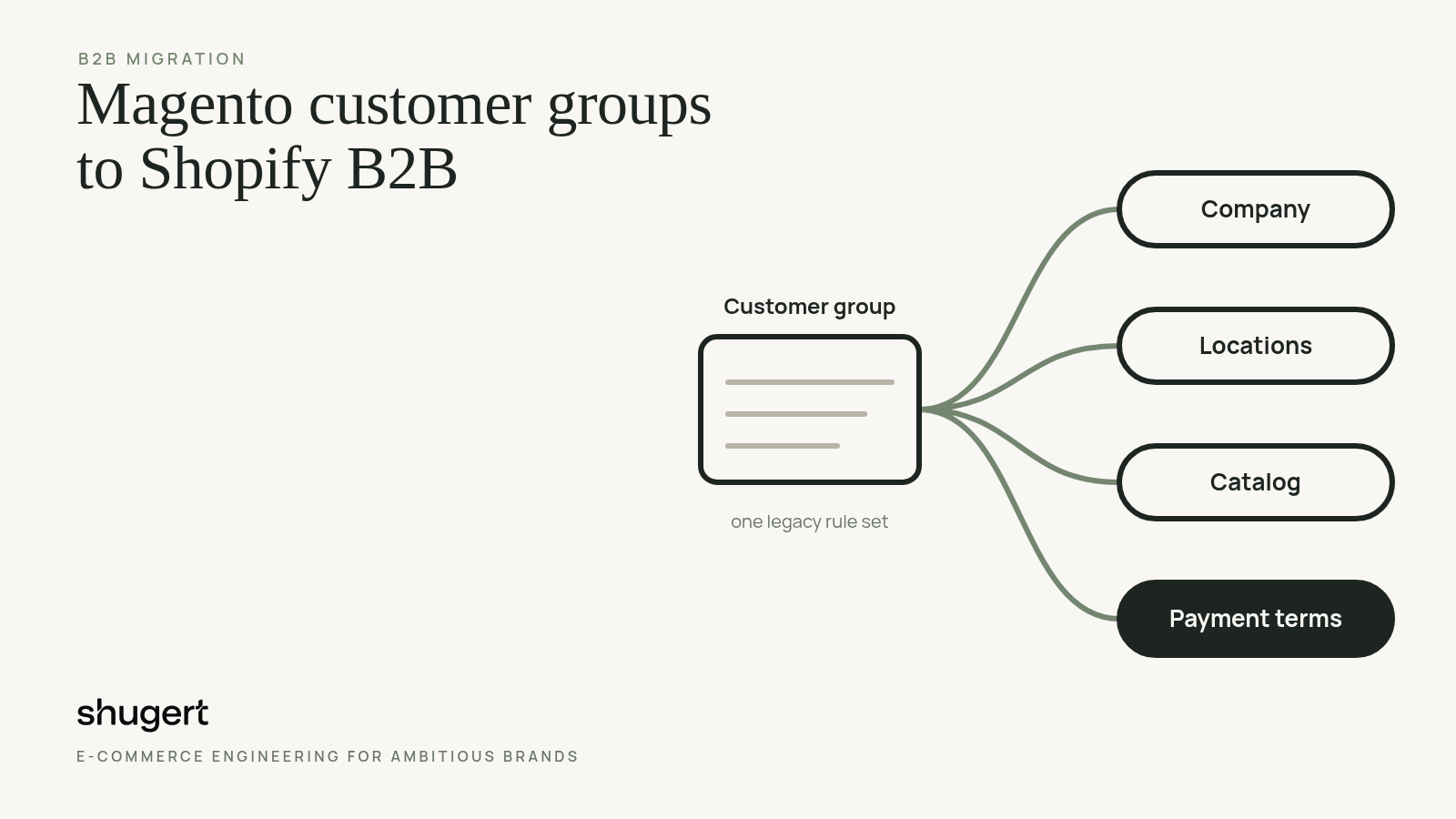
Commodity migration checklists treat moving Magento customer groups to Shopify B2B as a line item: export groups, turn them into companies or tags, import the CSV. That shortcut fails in production. A Magento group rarely holds one clean business concept. It usually bundles wholesale eligibility, a discount tier, tax treatment, catalog visibility, and payment rules inside one field.
When teams copy that structure straight into Shopify, the import can finish cleanly while the storefront breaks. Wholesale buyers see retail prices, retail shoppers view restricted SKUs, or multi-branch accounts receive the wrong net terms at checkout. An import with zero errors can still ship a broken storefront.
A PageSpeed Matters study reports that Shopify overtook Magento among the top 100,000 online stores in 2024. Platform share, though, says nothing about whether a specific wholesale pricing model will survive the move.
Moving established wholesale revenue off Magento means treating customer groups as pricing and eligibility inputs that split across Shopify companies, locations, catalogs, and customer segments. Size the Shopify plan from a real inventory of price combinations. Gate launch on a signed mapping matrix, a buyer test matrix, and a redirect plan. A completed data load only proves that records arrived. It says little about whether the right buyer sees the right price, catalog, terms, and order path.
Table of Contents
Map Each Magento Group to the Right Shopify Object
Before touching an export script, separate every commercial rule hidden inside your Magento customer groups and assign each one to its native Shopify B2B object. The table below gives the structural mapping that prevents pricing conflicts and authorization leaks.
| Magento group meaning | Shopify B2B object | Rule to check |
|---|
| Wholesale business account | Company with one company location per ship-to or bill-to site | Each location carries its own tax ID, addresses and terms |
| Regional or currency price tier | Catalog assigned to a market | Use when the same products and prices apply to a group of companies |
| Customer-specific negotiated price | Direct catalog on a company location | Shopify Plus only; reserve for true account exceptions |
| Tax-exempt group | Tax ID and tax exemption on the company location | Exemption belongs to the location, not the group label |
| Net payment eligibility | Payment terms on the company location | Verify each location separately |
| Retail VIP or loyalty tier | Customer segment or tag outside B2B | Does not grant B2B catalog access or prices |
Shopify does not treat wholesale buyers as tagged retail customers. As outlined in the Shopify Help Center guide on creating B2B companies, Shopify models each business account as a company containing one or more company locations, where every location can hold its own tax ID, tax exemptions, shipping and billing addresses, pricing, payment terms, and buyer contacts. Catalogs govern which products and prices those buyers see, and B2B buyers must log in through customer accounts and purchase for a specific company location to trigger B2B catalog pricing.
Where One-to-One Mappings Break Down
Three rows in that table trigger most post-migration tickets. First, merchants routinely turn tax-exempt Magento groups into standalone catalogs or tags. In Shopify B2B, tax exemptions live on the company location alongside the legal tax ID, so tying exemption status to a customer label fails the moment a single business operates one taxable warehouse and one tax-exempt branch.
Second, teams often migrate every regional pricing tier as a direct customer exception instead of assigning a shared catalog to a Shopify Market. Markets handle shared regional and currency assortments cleanly, reserving direct location catalogs for genuine negotiated contracts.
Third, retail loyalty tiers and employee discount groups do not belong inside Shopify B2B at all. Moving retail VIPs into B2B companies pollutes account reporting and risks exposing wholesale checkout flows to consumer shoppers; those audiences stay in standard customer segments.
A Multi-Rule Magento Group Split in Practice
Consider a typical distributor group in Magento that bundles a 12 percent category discount, net 30 payment terms, and a resale tax exemption for a regional buyer with two warehouses. Copying that group into one Shopify company or one customer tag destroys the commercial rules. Instead, that single Magento group splits into one Shopify company, two company locations (each holding its own address and tax exemption), one market catalog carrying the percentage discount, and one payment term assignment verified on both locations.
Working rule: A Magento customer group is a pricing and eligibility input, never a direct template for a Shopify customer record. One Magento group often produces two or three distinct Shopify objects, while a single Shopify company frequently absorbs contacts from several legacy Magento groups.
How to Build the Group-to-Company Mapping Matrix
You can't size a Shopify plan, design ERP integrations, or estimate engineering effort until every Magento customer group is decomposed on paper. The group-to-company mapping matrix serves as the single source of truth for both the data migration and the financial audit. Build it before choosing a Shopify license tier, because the matrix produces the exact catalog and exception counts that determine platform fit.
Shopify's B2B features let merchants personalize products, pricing, currency, payment methods, shipping methods, and store content at the company and location level. That architecture requires cleanly separating the legal business entity, each ship-to or bill-to address, and the individual buyers who place orders on its behalf.
Audit and Classify Every Legacy Group
Start with a complete database extraction rather than relying on tribal knowledge from sales reps. Many Magento stores carry five years of forgotten groups created for one-off trade shows or expired distributor agreements.
- Export every Magento group with full rule context. Pull the group ID, member count, active catalog and cart price rules, assigned tax class, website scope, and linked ERP account ID. Include 12-month order volume so the team can immediately spot dormant groups worth retiring instead of migrating.
- Classify each group by commercial purpose. Tag every row as a pricing tier, a legal business account, a purchasing role, or a marketing segment. If one Magento group carries two purposes, split it into separate columns so neither rule gets lost during import.
- Normalize identifiers and purge duplicates. Match customer records by tax ID and ERP account number rather than display name. Flag duplicate business accounts created when two buyers from the same distributor registered independently on Magento.
Never infer company ownership from an email domain or a Magento group label alone. Franchisees, independent reps, and holding-company subsidiaries routinely share domains while operating under separate legal entities, tax IDs, and credit limits.
Map Account Relationships and Pricing Precedence
Once the entities are clean, translate buyer relationships into Shopify's hierarchy so no contact inherits unauthorized pricing or terms.
- Link buyers to legal entities and purchasing contexts: Assign each Magento customer to the Shopify company matching their legal account. When a single purchasing manager buys for two distinct subsidiaries, map that email to separate company-location contexts rather than merging the accounts.
- Assign every ship-to and bill-to site to a company location: Document each site's exact tax ID, exemption certificate status, shipping address, billing address, and approved payment terms. Never assume headquarters terms apply automatically to satellite branches.
- Define catalog assignments cleanly: Map shared wholesale tiers to market catalogs, and flag only true account-specific price lists for direct company-location catalogs on Shopify Plus.
- Document expected prices where catalogs overlap: Shopify doesn't let you rank catalogs. When a company location has several catalogs containing the same product, the storefront shows the lowest overlapping price. Quantity rules and volume price breaks are not part of that comparison, so specify and test them separately. If a market catalog discount undercuts a negotiated fixed price, the buyer gets the market price.
Finish the matrix by collecting formal sign-off from the people who own pricing and finance before a single script executes. When finance signs the matrix, disputes over whether a migrated price looks right during QA vanish because the expected output is already locked.
Choose a Shopify Plan Based on Your Catalog Count
Selecting between standard Shopify plans and Shopify Plus for a B2B replatform isn't a branding preference or a guess about revenue size. It's a math problem solved directly from your signed mapping matrix.
Shopify's B2B plan documentation sets the catalog limits by plan. Standard plans cap active B2B market catalog assignments and omit direct company-level catalogs, while Shopify Plus lifts the catalog ceiling and allows account-specific assignments.
| Plan | Market catalog assignments | Direct company or location catalogs | Max catalogs per location |
|---|
| Basic | Up to 3 active across B2B markets | No | 25 |
| Grow | Up to 3 active across B2B markets | No | 25 |
| Advanced | Up to 3 active across B2B markets | No | 25 |
| Shopify Plus | Unlimited | Yes | 25 |
Count Real Price Combinations Instead of Group Names
Teams get burned when they look at four Magento customer groups and assume they'll fit inside three B2B market catalogs with minor tweaks. Raw group counts hide the actual multiplier. Count distinct product assortments, currencies, geographic regions, customer-specific price exceptions, and overlapping tier rules straight from a full Magento pricing export.
Say a manufacturer runs five regional wholesale tiers across North America and Europe alongside eight key distributor accounts carrying negotiated fixed prices. That configuration demands more than three active market catalogs plus eight direct company-location catalogs. Standard plans can't hold that model natively, making Shopify Plus technically mandatory.
For merchants whose architecture spans complex B2B catalogs, ERP synchronization, or multi-store governance, Shugert runs those builds through its Shopify Plus agency architecture path, whereas established brands without enterprise-only requirements can launch on standard Shopify and upgrade later if their wholesale structure expands.
Avoid the Two Common Plan Workaround Traps
When merchants try to squeeze an oversized Magento ruleset onto a lower plan to save on platform fees, two predictable failure modes appear:
- Collapsing separate Magento websites into one market: Merging distinct regional storefronts with different assortments or currencies into a single market breaks localized pricing and forces awkward SKU exclusions that break down during promotions.
- Treating customer tags as access control: Using theme-level Liquid checks tied to customer tags to hide products or simulate tier pricing creates fragile storefronts where clever buyers can still view hidden variants via cart APIs or receive the wrong price at checkout.
Apply a straightforward threshold test to your inventory. If all shared wholesale tiers fit cleanly inside three active B2B market catalogs and zero accounts require bespoke price lists, a lower Shopify plan can support the store without custom workarounds. The moment your signed matrix requires a fourth shared market catalog or even one genuine negotiated company catalog, scope for Shopify Plus from day one.
Rebuild Group Pricing Rules Without Losing Terms
Trying to copy Magento catalog price rules and shopping cart price rules verbatim into Shopify B2B almost always creates technical debt. Magento's pricing engine evaluates stacked rules dynamically at runtime, whereas Shopify B2B resolves pricing cleanly through structured catalog price lists, percentage adjustments, and fixed overrides. Treat the migration as an opportunity to rationalize fragmented legacy discounts rather than rebuilding ten years of overlapping rules.
Map each legacy pricing mechanism to its native Shopify B2B counterpart first, then flag every rule that requires an architectural fallback.
| Magento rule | Shopify B2B mechanism | Fallback when no native match |
|---|
| Category-wide percentage discount | Catalog percentage adjustment | Reduce catalog count by consolidating groups before adding exceptions |
| Negotiated fixed price per SKU | Fixed catalog price on a product or variant | Direct location catalog on Shopify Plus; otherwise rationalize the price list |
| Quantity-based price tier | Quantity rules and volume price breaks in the catalog | Test below, at and above each break, separately from the lowest-price comparison |
| Net payment terms | Payment terms on the company location | Source terms from the ERP through an integration |
| Conditional cart logic | Not native to catalogs | Shopify Functions or an external pricing integration, validated against the Magento export |
Separate Stacked Rules by Business Purpose
In Shopify, each catalog defines product availability alongside either percentage adjustments or fixed prices on individual products and variants, and on Shopify Plus those catalogs attach directly to company locations for account-specific rates.
A common migration snare occurs when a Magento customer group combines a category-wide percentage discount, SKU-level negotiated prices for top-selling items, and quantity-based price breaks all at once. Rebuilding that stack cleanly means separating each layer by purpose:
- Standard category discounts: Use the catalog's percentage adjustment, consolidating overlapping Magento tiers wherever possible. Remember that a percentage catalog that overlaps a fixed-price catalog can win if its result is lower.
- Negotiated SKU overrides: Load contracted rates as fixed catalog prices on specific products or variants inside the account's assigned catalog.
- Volume and case-pack tiers: Configure quantity rules and volume price breaks inside the catalog rather than scripting custom cart discounts, and test them on their own because they sit outside the lowest-price comparison.
- Complex conditional cart rules: When legacy Magento logic depends on cross-category combinations or custom spend thresholds that catalogs can't express natively, implement the rule through Shopify Functions or targeted Shopify app development that operates safely inside Shopify's checkout architecture.
Guard Against Pre-Login Price Exposure and Drift
Commercial-rule loss at checkout is only half the risk; exposing wholesale rates to anonymous visitors or retail shoppers can violate distributor agreements overnight. Never let wholesale catalog prices render before buyer authentication, and never rely on front-end customer tags to enforce price authorization.
Before locking your catalog configuration, validate calculated prices in Shopify against a representative Magento pricing export. Test every combination of customer group, SKU, variant, order quantity, currency, and discount stack. Any Magento rule that produces a penny of variance or fails to map cleanly should be redesigned or formally retired with finance approval before cutover, never patched reactively after launch.
Import Companies, Catalogs and Buyer Access
Flat customer CSV imports can't build a B2B account hierarchy. Importing Magento customer groups into Shopify B2B requires an ordered, reconcilable load that preserves referential integrity between legal companies, physical locations, price catalogs, and individual buyer logins.
Sequence the API Load and Reconcile Every Batch
For custom B2B imports, the GraphQL Admin API's company, company location and catalog objects are the usual foundation. Scripted API runs give engineering teams deterministic control over parent-child relationships that flat spreadsheets break.
Execute the migration in four strict stages, reconciling record counts against the signed mapping matrix after every batch:
- Load companies and company locations first. Create every legal company profile, attach its ship-to and bill-to locations, and populate tax IDs, exemption flags, and payment terms. Confirm the total company and location counts match the matrix before moving on.
- Push catalogs, fixed prices, and volume rules. Build market catalogs and direct location catalogs through the Admin API, populate SKU-level fixed prices, and verify total SKU price counts per catalog.
- Create company contacts with explicit location permissions. Attach each buyer email solely to the specific company locations they're authorized to order for. Double-check multi-company buyers so their login surfaces distinct purchasing contexts without cross-contaminating catalogs.
- Import order-history references last. Link historical Magento orders to the right migrated buyer records so account reps and customers retain purchasing visibility for reorders and customer lifetime value reporting.
Handle Credentials, ERP Ownership and Leak Checks
Magento passwords don't carry over, and B2B buyers sign in through Shopify customer accounts, so plan how and when each buyer is invited. Coordinate that communication window with sales and account managers, and verify first-time login across representative accounts from your matrix so buyers aren't locked out on launch morning.
Where an ERP owns customer pricing, treat the initial Shopify catalog load as the baseline and document one system of record per price field. Without explicit field ownership, the first nightly ERP sync can silently wipe out manually loaded negotiated rates.
Close the import phase with two operational safeguards. First, run a leak check from both a logged-out browser session and a standard retail test account to confirm restricted products and wholesale rates stay hidden. Second, retain a structured reject file and run log for every API batch so engineers can fix malformed records and re-run imports idempotently without creating duplicate companies or locations.
Test Buyer Access, Pricing and ERP Orders Before Cutover
Finished imports prove only that Shopify accepted your JSON payloads. They don't prove that buyers see the right products, pay the right prices, or generate clean ERP invoices. Every B2B migration needs a role-based transaction validation matrix executed before DNS ever switches.
| Buyer or system scenario | What to verify | Pass condition |
|---|
| Standard wholesale buyer | Visible products, negotiated prices and checkout | Only authorized products and prices appear |
| Account with negotiated prices | Fixed prices and quantity breaks | Matches the approved mapping matrix exactly |
| Multi-location buyer | Catalog and terms change when the location changes | No pricing carries over between companies |
| Net-terms buyer | Payment terms offered at checkout | Only entitled terms are offered |
| Buyer who also shops direct to consumer | Retail and B2B pricing separation | Retail prices show without B2B login |
| Unauthorized buyer | Restricted products and terms | Access is denied |
| ERP order receipt | Customer, location, SKU, price and terms in the ERP | Zero mismatches in the test batch |
Run End-to-End Scenarios Against the Approved Matrix
Select real test accounts covering every pricing tier, company-location structure, currency, payment term, and purchasing role in your business. Per the Shopify B2B catalogs documentation, buyers only receive catalog pricing after logging in and buying for a specific company location. Set the launch bar at full agreement with the signed test matrix across every pricing tier, region, currency, quantity break and D2C/B2B boundary.
Walk each test buyer through the exact production authentication flow. Verify storefront catalog visibility, product page pricing, quantity break updates in the cart, shipping methods, tax calculation, and available checkout payment terms. Then submit a full live-style order from each company location to confirm order ownership records accurately.
Compare every output strictly against the finance-approved mapping matrix, never against whatever values Shopify happens to show on screen. When teams validate against the live staging admin instead of the source matrix, configuration errors pass QA.
Verify Negative Cases and Downstream ERP Payloads
Positive tests catch broken pricing; negative tests catch commercial exposure. Log in as an unauthorized buyer and attempt to reach restricted product URLs directly, add restricted SKUs to the cart, or trigger net payment terms meant for credit-approved distributors. Verify that multi-location buyers switching from Branch A to Branch B immediately see Branch B's catalog and terms with zero price carryover.
Next, trace every completed test order downstream into your ERP or OMS. Confirm the order arrives mapped to the right legal customer account, exact ship-to location, SKU, contracted unit price, tax flag, and net payment terms. Complex B2B builds often lean on dedicated Shopify integration services to enforce strict data contracts and failure handling between Shopify, ERP, OMS, and finance systems so mismatched line items never stall warehouse fulfillment.
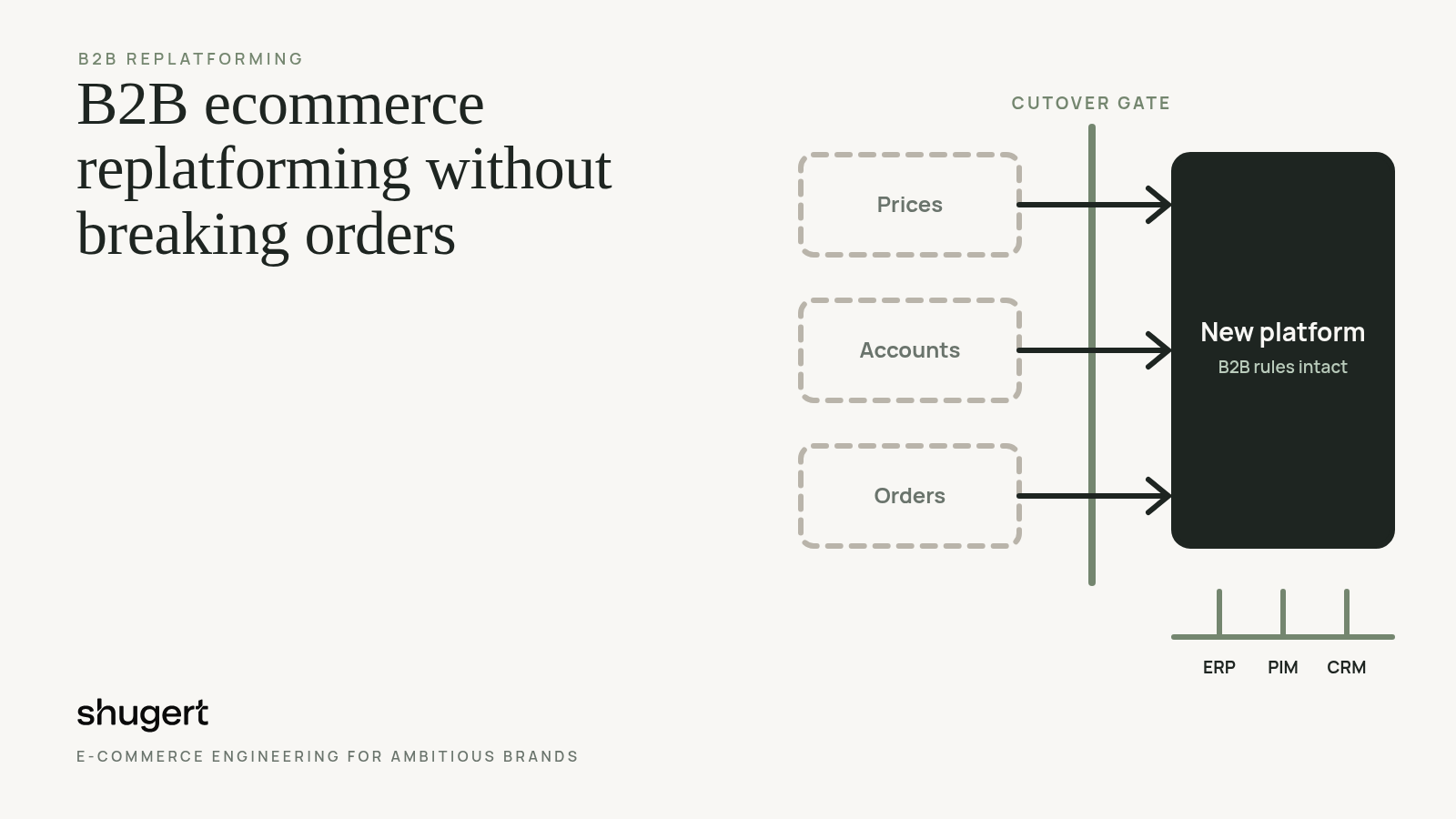
Enforce an unambiguous cutover gate: zero unresolved critical discrepancies involving customer access, pricing accuracy, or financial transactions. Any minor exception must be logged with a named owner and formally resolved or accepted in writing before launch. A migration is ready when tested purchasing workflows satisfy the business requirements, not when the migration scripts print "complete."
Govern Cutover, Redirects and Launch Sign-Off
Locking a launch date before QA finishes is how B2B migrations blow up on Monday morning. Hold the cutover calendar until four gates clear simultaneously: the group-to-company mapping matrix is signed, the selected Shopify plan matches the catalog inventory, the buyer and ERP test matrix passes the zero-discrepancy gate defined in the testing stage, and the complete 301 redirect map is loaded in staging.
Require written sign-off from four distinct owners before flipping DNS: the pricing lead, the finance owner, the ERP owner, and the Shopify technical lead. Shared governance keeps technical teams from accidentally approving commercial trade-offs they don't own. A developer can confirm a price list imports cleanly; only the pricing lead can confirm the prices in it are the ones customers negotiated.
Protect Organic Equity and Keep Wholesale Pages Out of Search
Magento migrations force structural URL changes because Shopify enforces fixed path prefixes (/products/, /collections/, /pages/) and drops .html extensions and Magento store-code segments. Executing redirects cleanly prevents organic traffic drops while protecting wholesale pricing confidentiality.
- Map every live Magento URL pattern: Build a 301 redirect map covering store-code paths, category URLs, product URLs, and CMS pages to their exact Shopify targets before cutover.
- Keep the legacy sitemap reachable during re-indexing: Leave the old sitemap accessible until Google Search Console confirms the new Shopify URLs are indexed, and crawl the live storefront daily during week one to patch any emerging 404 errors immediately.
- Block B2B catalog views from search indexing: Verify that restricted B2B catalog URLs, gated collection templates, and authenticated price endpoints aren't crawlable or indexable so negotiated wholesale pricing never surfaces in search results.
Petwell moved more than 10,000 SKUs from Magento to Shopify Plus in 8 weeks with zero downtime, historical data migration and full redirect mapping. That kind of result comes from treating the redirect map as a launch gate rather than a cleanup task.
Post-Launch Verification and Scoping Checklist
Cutover isn't the finish line. During the first 48 hours after DNS switches, run a live price audit across every wholesale tier and currency, reconcile the first production batch of ERP orders line by line, and keep a documented rollback trigger ready in case a critical payment or tax integration misfires. A rollback trigger means a defined condition and a defined owner, agreed in writing before launch, so nobody improvises under pressure.
Scoping this kind of migration starts with four inputs: your current platform, your store count, the systems that own your data, and your hard launch constraint. Those four determine whether the engagement is a standard replatform or a Shopify Plus architecture path involving ERP, B2B, or multi-store complexity. Where a merchant is taking over or stabilizing an existing Shopify build, most engagements begin with a structured audit of the current theme and apps before touching B2B logic.
Shugert is a Shopify Select Partner specializing in complex Magento-to-Shopify Plus migrations, native B2B catalog architecture, custom Shopify Functions, and ERP integrations for established wholesale and DTC brands. Whether your team needs a defensible group-to-company mapping matrix before choosing a plan or senior engineering execution through a zero-downtime cutover, explore how Shugert scopes and delivers high-stakes B2B replatforms.