
Before a Magento-to-Shopify Migration: Engineering Decisions That Prevent Rework
A preflight guide to the catalog, integrations, SEO mapping, checkout, analytics, rehearsal, and launch decisions to close before a Magento-to-Shopify build begins.

Published
Before a Magento-to-Shopify Migration: Engineering Decisions That Prevent Rework
The expensive mistakes in a Magento-to-Shopify migration usually happen before the first import. Teams start moving records before they have separated Magento-specific implementation from the business requirements that still need to survive.
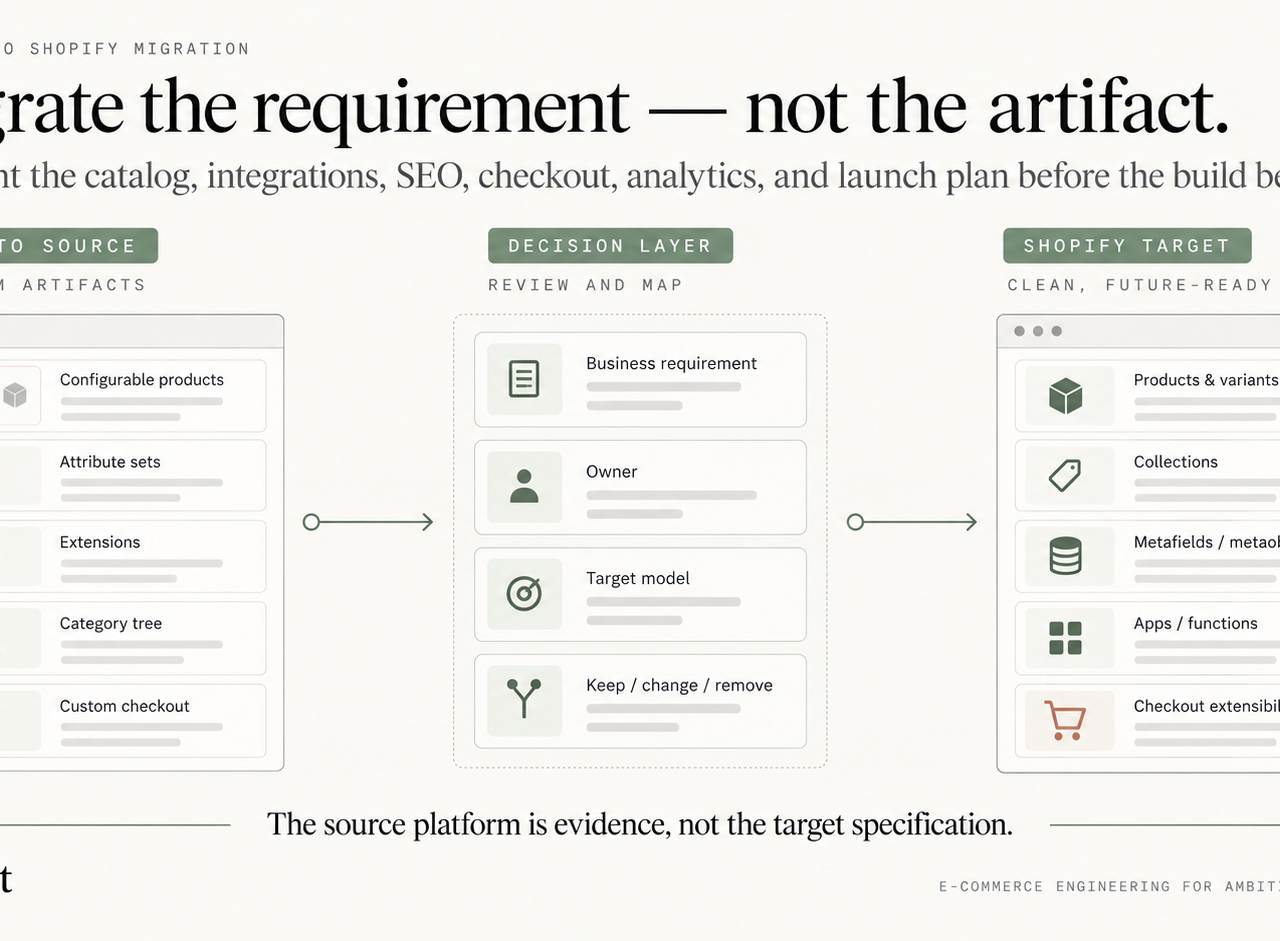
Catalog logic, extensions, URLs, customer workflows, integrations, and checkout customizations do not transfer one-to-one. A CSV can move rows. It cannot decide whether a Magento attribute should become a Shopify variant option, metafield, metaobject, collection rule, custom app, integration field, or something the business no longer needs.
This guide focuses on the preflight decisions that should be closed before implementation. It intentionally supports Shugert's primary Magento-to-Shopify migration guide rather than competing with it for the head term.
The central rule is simple:
Migrate business requirements, not Magento artifacts.
If the project is already moving toward execution, Shugert's Shopify migration service covers discovery, architecture, implementation, SEO continuity, launch, and stabilization.
Treat the Migration as an Architecture Project
A mature Magento store contains years of decisions embedded in configurable products, attribute sets, category trees, customer groups, extensions, custom modules, cron jobs, integrations, and admin workflows. Some still support revenue. Others exist because a historical module required them or because the platform made a workaround necessary.
Shopify uses a different operating model. Products, variants, collections, metafields, metaobjects, Shopify Functions, apps, APIs, and checkout extension points reward simpler structures and clearer ownership.
Rebuilding Magento literally inside Shopify creates technical debt on day one. A large Magento attribute set copied into dozens of metafields without a data contract makes merchandising difficult. A deeply nested category tree reproduced as storefront navigation can create weak information architecture. A checkout customization copied feature-for-feature may not fit Shopify's supported model at all.
The source platform is evidence of current behavior. It is not the specification for the target platform.
What Discovery Must Cover Before the Build
A serious migration scope includes more than products and customers.
Commerce data
Inventory products, variants, configurable relationships, attributes, images, pricing, stock, customers, addresses, order history, discounts, gift-card or loyalty dependencies, content, and business-specific records.
For every field, answer:
- Which system is the source of truth?
- Does the field drive purchasing, merchandising, filtering, reporting, or only legacy administration?
- Who owns its meaning after launch?
- What happens when the value is missing or invalid?
Storefront architecture
Document templates, navigation, search, filtering, merchandising, accessibility, mobile behavior, content blocks, product recommendations, account flows, and any frontend behavior that depends on Magento modules.
Operational systems
Map ERP, PIM, WMS, CRM, tax, shipping, fulfillment, payments, subscriptions, customer service, fraud, loyalty, and reporting connections. Record the direction of data flow, triggers, retry behavior, reconciliation process, and operational owner.
Search visibility
Export the URL universe before theme development. Include products, categories, CMS pages, blog content, legacy .html paths, image URLs where relevant, important parameter patterns, backlinks, analytics landing pages, and Search Console data.
Measurement
Document analytics events, advertising pixels, consent behavior, server-side measurement, checkout events, purchase reconciliation, and dashboards that must remain comparable after launch.
Discovery should end with approved target architecture, exception rules, ownership, and a validation plan—not just a spreadsheet of source fields.
Translate the Catalog Model Before Exporting Data
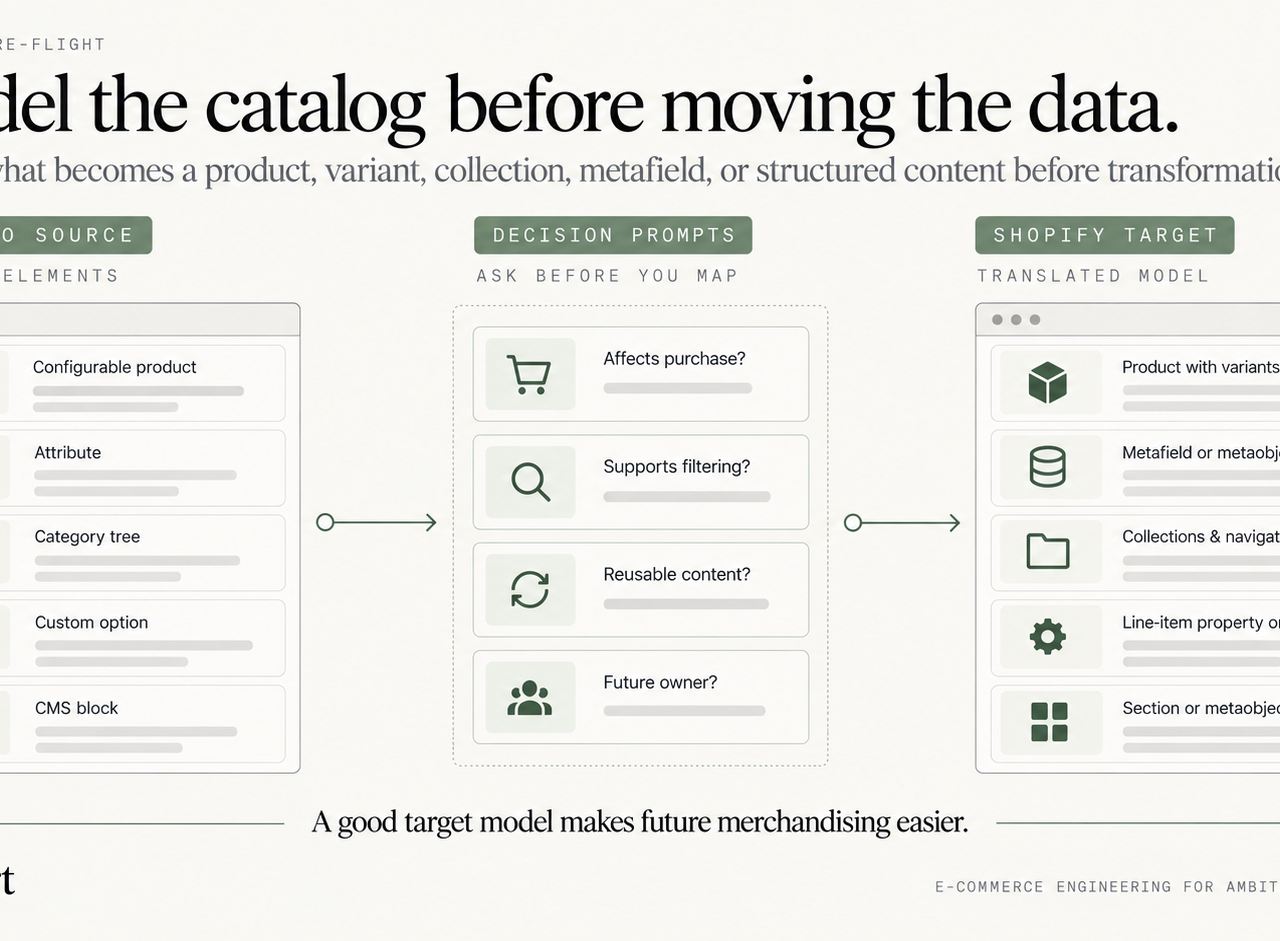
Magento can represent one sellable item through a configurable product, multiple simple products, attribute sets, custom options, scoped values, nested categories, and extension-specific fields. Shopify organizes comparable information differently.
The team should decide the target model before transformation begins.
Data owners should approve the target model before transformation starts. Teams building their governance process can consult these data migration best practices 2025, then adapt the controls to the Shopify implementation.
| Magento structure | Possible Shopify target | Decision to make |
|---|---|---|
| Simple product | Product or variant | Standalone item or child of a parent product? |
| Configurable product | Product with variants | Which options define the actual purchase? |
| Attribute | Variant option, metafield, metaobject | Does it affect purchase, filtering, content, or reuse? |
| Attribute set | Product data contract | What fields are required for this product type? |
| Category tree | Collections + navigation | Which branches are commercial landing pages versus admin taxonomy? |
| Custom option | Variant, line-item property, custom workflow | Does it change inventory, price, personalization, or only instructions? |
| CMS block | Theme section, page, metaobject | Should the content be reusable and structured? |
Do not create variants for descriptive data simply because Magento stores it near purchasing options. Do not create collections for every administrative category simply because it exists in the source tree.
A good target model should make future merchandising easier than it was on Magento.
For a practical example of catalog scale, see what we learned migrating 8,000 SKUs to Shopify.
Customer and Order History Needs an Operating Decision
Customer migration is not only a field-mapping problem. Account behavior, consent, company relationships, tags, addresses, password reset or activation, support workflows, and identity rules need to be designed before launch.
Historical orders need the same qualification. Decide:
- which orders customer service must see in Shopify;
- which legacy system remains authoritative for older transactions;
- how refunds and returns work across the cutover boundary;
- whether imported history should trigger automations;
- how financial reporting reconciles historical and new orders.
Stored credentials and third-party balances may require a transition process rather than literal transfer. The requirement is continuity for the customer and operations team, not structural similarity between databases.
SEO Migration Strategy Beyond Redirects\n\nSEO continuity should be treated as migration architecture, not post-launch cleanup. A structured ecommerce migration SEO process should account for redirect mapping, canonical ownership, internal links, metadata, structured data, and indexation before cutover.
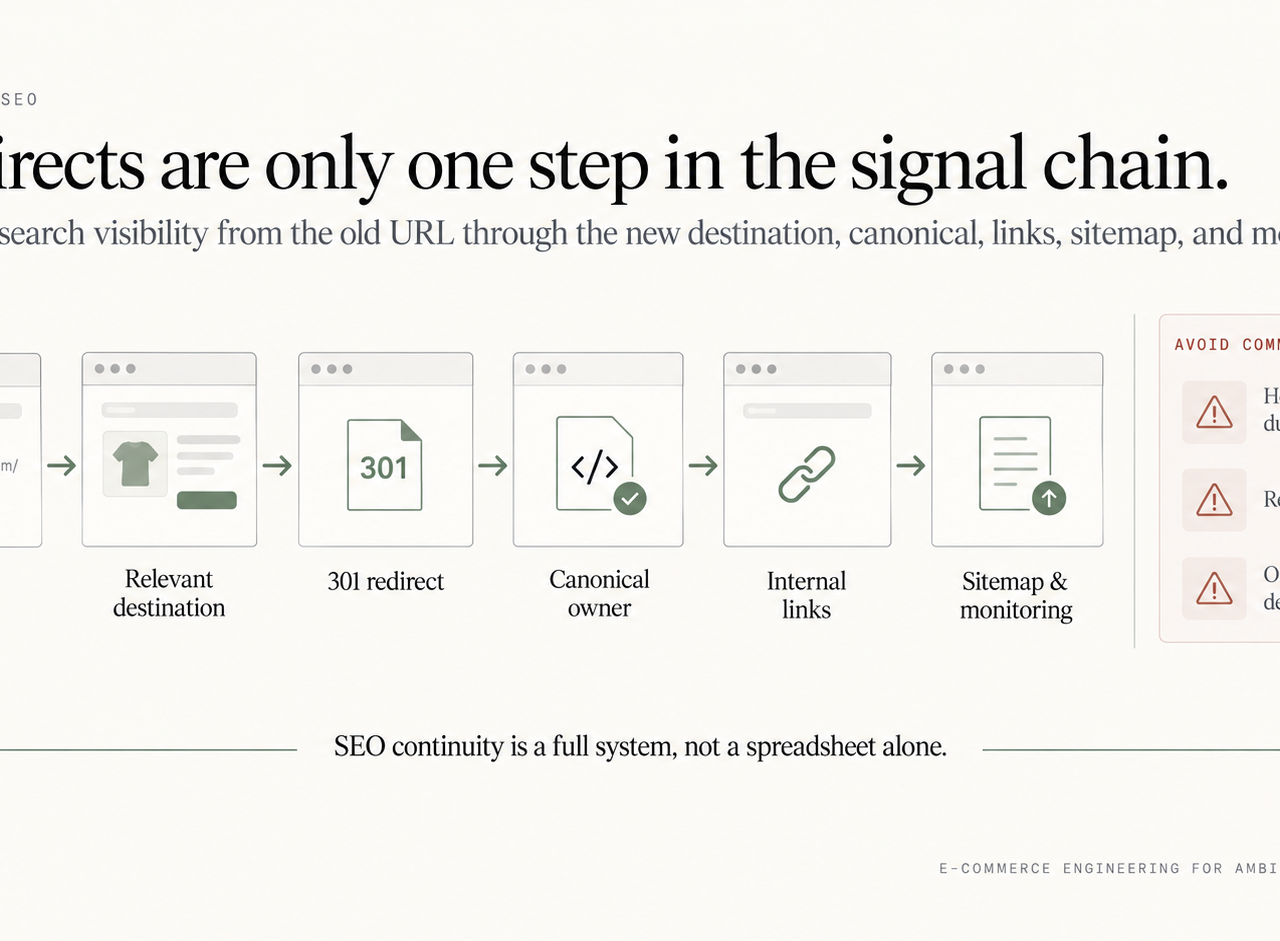
A redirect spreadsheet is necessary, but it does not preserve organic visibility by itself. The complete chain is:
old URL → relevant destination → permanent redirect → canonical → internal links → sitemap → monitoring
Build mappings around relevance. A discontinued product may point to a true successor, its closest collection, a maintained support page, or return 404/410 when no useful destination exists. Sending every retired Magento URL to the homepage or a broad category creates poor user paths and can produce soft-404 behavior.
For each mapping, record:
- old URL and current status;
- destination URL;
- mapping reason;
- redirect implementation;
- canonical expectation;
- metadata and structured-data requirements;
- internal links that need updating;
- validation status and launch notes.
Google recommends submitting the new sitemap in Search Console after a move with URL changes (Google's site-move guidance). Shopify's Search Console guidance also covers permanent redirects, submitting a Change of Address from a domain-level property, and keeping redirects live for at least 180 days (Shopify's Search Console guidance). In practice, retain redirects for as long as the business can support them, with a longer operational window providing more protection for users, crawlers, and external links.
The Shopify destination system should be validated before launch. Inspect rendered templates and source output for title tags, canonicals, robots directives, structured data, product links, pagination, faceted navigation, and hreflang where applicable. The sitemap should contain intended canonical URLs—not staging pages, redirects, duplicates, or blocked states.
Internal links should point directly to new destinations. Do not leave the new theme depending on redirects from old internal URLs.
Audit Extensions by Business Requirement
Magento extension inventories are usually long and misleading. An extension may provide several features, only one of which the business still uses. Another may exist only because Magento lacks a capability that Shopify provides natively.
For each extension or custom module, classify the underlying requirement:
- Native Shopify capability: use the platform when it cleanly covers the need.
- Shopify app: choose an app when the requirement is standard and the dependency is acceptable.
- Shopify Function or extension: use supported platform primitives for commerce logic where appropriate.
- Custom app or integration: build when the requirement is differentiating and has a clear owner.
- Remove: do not migrate functionality that no longer creates value.
The objective is not extension parity. It is a smaller, more intentional dependency surface after launch.
Every app added to the target stack should have a business owner, data scope, storefront cost, failure mode, recurring cost, and removal plan.
Checkout Modernization Belongs in Discovery
Checkout is one of the easiest places to underestimate migration scope because Magento allows deep custom application behavior while Shopify uses defined extension boundaries.
Inventory current Magento checkout behavior before development:
- discounts and promotions;
- shipping calculations and validations;
- payment methods and routing;
- tax behavior;
- custom fields;
- customer-group logic;
- B2B company context;
- subscriptions;
- analytics and pixels;
- post-purchase or order-status behavior.
Then map each behavior to current Shopify capabilities, Checkout Extensibility, Shopify Functions, apps, or an external workflow. Legacy Shopify checkout customization patterns should not be used as the target architecture for a new migration.
Our Checkout Extensibility resource covers the supported Shopify model in more detail.
Performance Validation Must Use Realistic Templates
A blank development theme says little about production performance. Establish representative Magento baselines for homepage, collection, product, search, and other critical templates, then test equivalent Shopify pages with realistic content and required integrations.
Review:
- hero and product media loading;
- fonts and render-blocking assets;
- third-party requests;
- JavaScript execution and long tasks;
- layout stability;
- filters and variant interaction;
- analytics and consent overhead;
- app behavior by template.
Performance and SEO should be validated together because theme, script, image, and routing changes ship in the same release.

Rehearse the Migration Before Cutover
The migration should not be tested for the first time on launch day.
Run at least one realistic rehearsal that includes:
- source-data extraction;
- transformation and import;
- exception reporting;
- integration synchronization;
- URL and redirect validation;
- checkout and order testing;
- analytics verification;
- representative performance testing;
- inventory and pricing reconciliation;
- timing of the full runbook.
Use the rehearsal to identify manual steps that should be automated and automation that lacks recovery procedures.
The Shopify migration timeline resource can help translate these workstreams into a delivery sequence.
Define Launch Acceptance Criteria Before Launch Week
A migration should have written go/no-go criteria instead of relying on a general sense that the store is ready.
Useful acceptance areas include:
- catalog counts and sampled product accuracy;
- inventory and pricing reconciliation;
- customer and company-account behavior;
- critical integrations and retry paths;
- payment, tax, shipping, discount, and fulfillment scenarios;
- redirect coverage and direct destination checks;
- canonical and robots validation;
- structured data and sitemaps;
- analytics and purchase reconciliation;
- Core Web Vitals and storefront errors;
- rollback or incident ownership.
The first crawl cycles after cutover require active observation. Monitor Search Console, redirect errors, canonical selection, sitemap processing, high-value landing pages, analytics, integration failures, and storefront exceptions.
A successful migration is not one that launches without visible errors. It is one whose catalog, search signals, purchase path, and operations converge on the new platform with controlled exceptions.
What to Decide Before Choosing Shopify or Shopify Plus
Plan selection should follow requirements, not prestige. Document B2B needs, checkout complexity, organizational permissions, international operations, automation, catalogs, expansion structure, integration governance, and support expectations.
Do not choose Shopify Plus merely to reproduce Magento complexity. Choose it when the required capabilities and operating model justify it.
Shugert's Petwell Magento migration case study documents the architecture and cutover behind a 10,000+ SKU move to Shopify Plus and provides a useful reference for what real migration complexity looks like.
The Preflight Checklist
Before implementation begins, the project should be able to answer these questions without hand-waving:
- What business requirement does each major Magento customization serve?
- What is the approved Shopify catalog and product data model?
- Which URLs own search intent after launch?
- Which old URLs map one-to-one, consolidate, retire, or require special handling?
- Which system owns each critical field and integration after launch?
- How will customer accounts and historical orders behave?
- Which apps are truly required and what is their storefront/data cost?
- How does every checkout requirement map to a supported Shopify capability?
- What is the analytics source of truth before and after cutover?
- What did the rehearsal expose?
- What exact conditions trigger a launch hold?
- Who owns the first days of stabilization?
Closing those decisions early turns the migration from an open-ended rebuild into an executable program. For the full evergreen planning framework, continue with the primary Magento-to-Shopify migration guide, or move into implementation through Shopify migration.
Keep exploring this topic
Deeper references from the Shugert library and the service that turns this work into a fixed scope.
Related resources
- MagentoMagento to Shopify Migration: What Agencies Get WrongA real scenario from 30+ migrations: what breaks, what gets silently missed, and how serious agencies handle URL mapping, metafields, and Shopify Functions…
- Shopify PlusShopify Plus Migration: Cost, Timeline & ProcessPlan a Shopify Plus migration with realistic costs, timelines, SEO safeguards, checkout, integrations, testing, cutover and stabilization.
- MigrationShopify Migration Timeline for Established DTC BrandsWhat replatforming to Shopify or Shopify Plus actually looks like when you're doing $1M+/year, phases, risks, and how to avoid SEO and revenue loss during…
Related services
Keep reading

What We Learned Migrating 8,000 SKUs to Shopify
Large-catalog Shopify migrations expose problems that small stores can hide: redirect mapping, product modeling, crawl control, QA, and cutover sequencing.
Variants, Metafields, Tags, or Metaobjects? Modeling Large Catalogs Before Migration
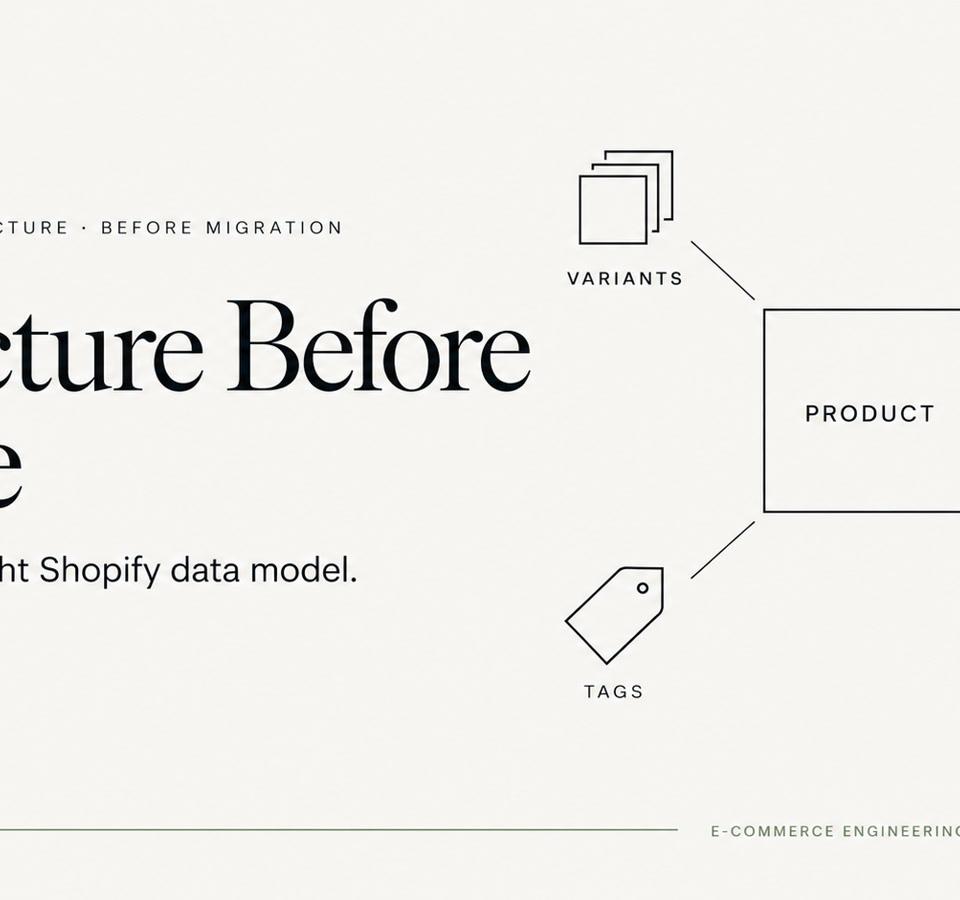
Large Shopify migrations become easier when product attributes have clear ownership before import. Here is how we decide what belongs in variants, metafields, tags and metaobjects.

Magento Configurable Products to Shopify: A Smart Move
Learn how to migrate your Magento configurable products to Shopify in 2026 with this practical guide. Preserve data, save time, and boost sales.