
Why Redirect Maps Fail on Large Shopify Migrations
Large migration redirect maps fail for predictable reasons: incomplete inventories, over-broad rules, redirect chains, weak validation, and no post-launch ownership.

Published
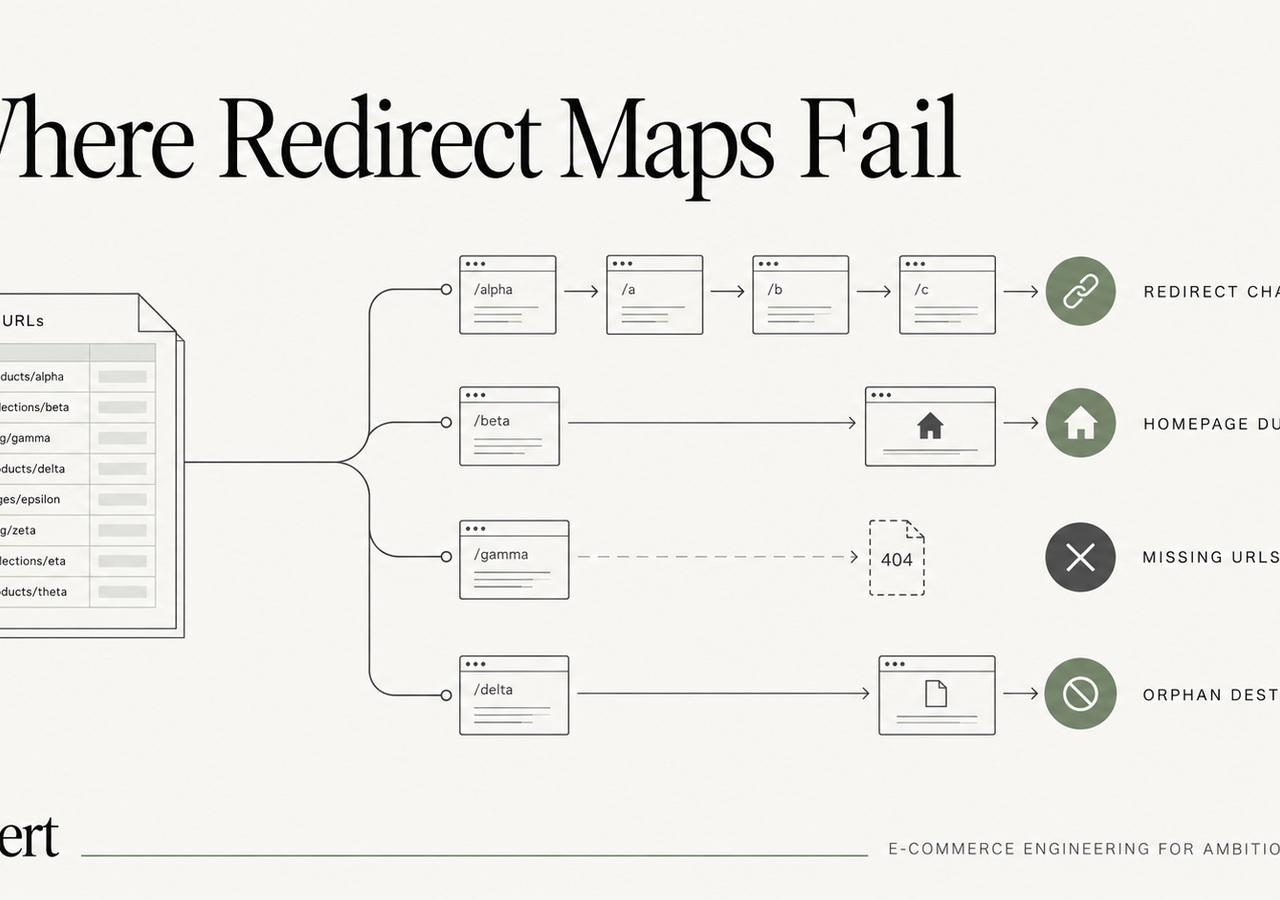
A redirect map can look complete in a spreadsheet and still fail badly in production.
That happens because redirect planning is not really a list-making exercise. On a large Shopify migration, it is a classification and validation problem. Thousands of old URLs have different histories, business value, backlink profiles, query footprints and replacement options. Treating them all as interchangeable is where the trouble starts.
Our dedicated Shopify 301 redirects guide owns the technical process. This field note is narrower: the failure modes we repeatedly see when teams build redirect maps for large catalogs.
Failure 1: the inventory starts with the CMS export
The old platform's product export is not the old website.
A complete migration inventory can include:
- product URLs that no longer exist in the current catalog;
- category and subcategory URLs;
- editorial content;
- landing pages created by marketing teams;
- PDFs and downloadable assets;
- old campaign URLs still carrying backlinks;
- locale or market paths;
- URLs exposed only through internal search, filters or old navigation;
- legacy URLs that Google still knows about even if nobody remembers them.
Google's site-move documentation recommends creating an old-to-new URL mapping before the move and using existing sitemaps, server logs, analytics and links to identify important URLs. That is the right mindset: inventory the website that search engines and users actually experienced, not just the records in a database.
For large migrations, we combine multiple sources and then normalize them into one deduplicated URL inventory.
Failure 2: every old URL gets forced to a destination
A redirect is not automatically better than a 404.
If an old page has no meaningful replacement, sending it to the home page or a vaguely related collection can create a poor user experience and a weak relevance signal. Google warns against redirecting many old URLs to an irrelevant destination and may treat such behavior as a soft 404.
The right question is not “where can this URL go?” It is “what is the closest legitimate replacement for the user's original intent?”
That can produce several outcomes:
- one-to-one redirect to a direct replacement;
- redirect to a closely matching parent category;
- consolidation into a stronger equivalent page;
- intentional 404/410 when the content is truly gone and has no substitute.
A good redirect map contains intentional non-redirect decisions too.
Failure 3: pattern rules hide exceptions
Regex and rule-based mapping are essential at scale. They are also dangerous when nobody audits the exceptions.
Suppose thousands of old product URLs follow a predictable structure. A rule can map most of them efficiently. But products that were renamed, merged, discontinued or assigned to a different family may need explicit targets.
We therefore separate:
- deterministic bulk rules;
- exception tables;
- manually reviewed high-value URLs.
The rule handles volume. The exceptions preserve meaning.
Failure 4: the map is validated as text, not as HTTP behavior
A spreadsheet can contain a perfectly formatted destination that returns 404, redirects again, is canonicalized somewhere else, or is blocked from indexing.
Before launch, we want the redirect map tested against the actual destination environment. For important URLs, we validate at least:
- old URL expected status;
- final destination status;
- number of redirect hops;
- final canonical;
- robots/indexability;
- whether the destination is internally linked;
- whether the destination belongs to the intended market/language.
Google recommends avoiding redirect chains during site moves and updating internal links to point directly to the new URLs. That means a “working” 301 is not enough if it creates unnecessary hops.
Failure 5: redirects are built from URLs instead of intent
Two old URLs that look similar can represent different search intent.
A product page and an educational buying guide may both contain the same product phrase, but they should not necessarily land on the same destination. Likewise, an old category can have stronger organic relevance than the replacement collection someone chose based only on catalog taxonomy.
We use search data and business context for the URLs that matter most:
- top organic landing pages;
- pages with meaningful backlinks;
- high-revenue pages;
- high-impression queries;
- URLs used in email, ads or external integrations.
This does not mean manually researching every URL. It means allocating human attention based on risk.

Failure 6: Shopify constraints are discovered after launch
Shopify supports URL redirects, including CSV import/export, but some paths are reserved and cannot be redirected in the normal way. Shopify documents these constraints in its URL redirect guide.
This matters when the source platform used paths that collide with Shopify conventions or when teams assume they can reproduce an old structure exactly.
We test representative rules inside Shopify before the final migration window rather than discovering platform-specific behavior during cutover.
Failure 7: nobody owns the map after launch
The redirect file should survive launch day.
During the first weeks, it becomes a diagnostic asset. If Search Console surfaces an unexpected old URL, or analytics shows a previously important landing page losing entrances, the map tells you what outcome was intended. Without that artifact, the team has to reconstruct the decision from memory.
Our first-30-days monitoring field note explains how we use the map after launch.
The validation rule we care about most
Every important old URL should end in one of three states:
- a relevant new 200 URL through a single permanent redirect;
- a deliberate consolidation target that preserves user intent;
- an intentional removal with no misleading redirect.
Anything else deserves investigation before the domain changes hands.
That standard sounds simple. Applying it consistently across thousands of URLs is why redirect engineering deserves its own workstream in a serious Shopify migration.
For the broader project sequence, see our Shopify migration guide. For a large-catalog example, see the Llantas Cavazos migration case study.
Keep exploring this topic
Deeper references from the Shugert library and the service that turns this work into a fixed scope.
Related resources
- MigrationShopify 301 Redirects for Large Catalogs: The MapFor Shopify migrations with 500+ URLs, the redirect map is a crawl-budget and SEO-equity problem, not a checklist item.
- MigrationMigrating to Shopify in 2026: What Actually ChangedA practical Shopify migration guide for inventory, data contracts, storefront scope, SEO continuity, integrations, QA, cutover and launch validation.
- SEOThe Shopify Technical SEO PlaybookTechnical SEO on Shopify is different from WordPress. Here's the audit checklist we run on every Shopify and Shopify Plus store: indexation, schema, Core…
Related services
Keep reading

What We Learned Migrating 8,000 SKUs to Shopify
Large-catalog Shopify migrations expose problems that small stores can hide: redirect mapping, product modeling, crawl control, QA, and cutover sequencing.
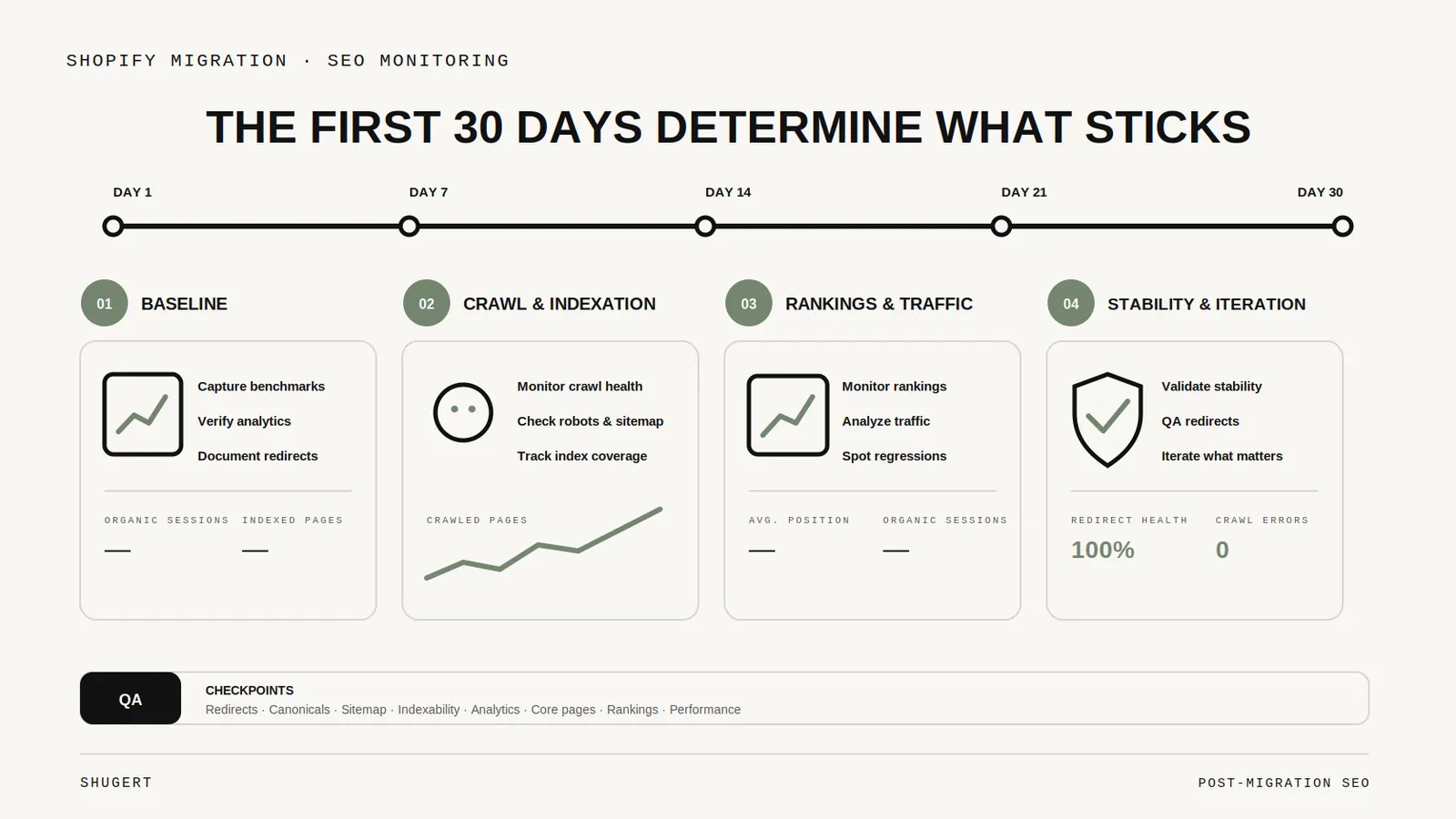
The First 30 Days After a Shopify Migration: SEO Monitoring That Actually Matters
What to watch after a Shopify migration, from redirect failures and sitemap processing to indexing, organic landing pages, canonicals, and conversion tracking.

Magento Extension Inventory: Decide What Shopify Needs Before Choosing Apps
An engineering framework for classifying Magento extensions before a Shopify migration: native capabilities, apps, custom solutions, external systems, or retirement.