
Shopify Headless Commerce: The 2026 Decision Guide
Shopify headless commerce keeps Shopify as the commerce engine and moves the storefront into a separate application. Here is when that trade is justified, how Hydrogen and Oxygen differ from a custom Next.js frontend, and the gates to clear before you rebuild.

Published
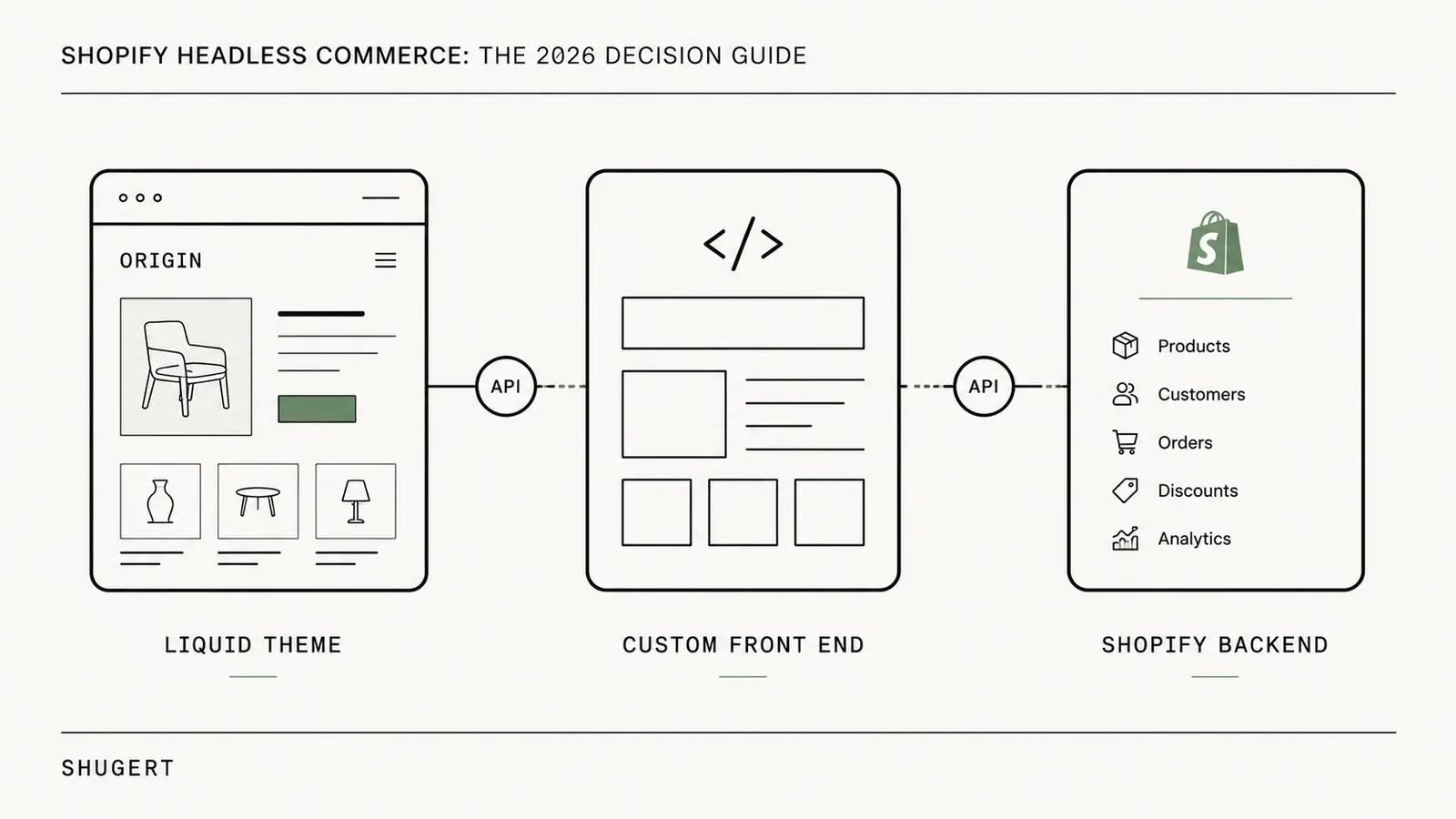
Shopify headless commerce means keeping Shopify as the commerce engine — catalog, checkout, payments, orders — while the storefront customers see is built as a separate application that requests data through the Storefront API instead of rendering in Liquid.
It is justified when the presentation layer is measurably constraining revenue, merchandising velocity, or multi-channel delivery, and the business can fund frontend engineering after launch. It is not justified when the real problem is an unoptimised theme, a bloated app stack, or unresolved performance debt. Those are cheaper to fix where they are.
A lot of established brands reach this question at roughly the same stage of growth. Revenue is healthy. Traffic is meaningful. The catalog is bigger. The app stack is heavier. The team wants richer landing pages, faster merchandising changes, cleaner mobile UX, and better control over how the store behaves across regions and channels.
Sometimes headless is the right move. Sometimes it is an expensive detour.
The decision matters more now because headless commerce is no longer niche. One market forecast values the category at US$2.13 billion in 2026 and projects US$7.24 billion by 2033, a 22.6% CAGR, with web-based commerce holding 53.4% share in 2026 and back-end technologies accounting for 60.4%, according to Coherent Market Insights. For merchants trying to unify DTC, mobile, retail, and regional storefronts, the operational challenge often overlaps with optimizing omnichannel customer journeys. Headless can support that strategy — but only when the business need is real and the implementation discipline is strong.
When a Shopify Theme Is No Longer Enough
A theme usually stops being enough long before a merchant says it out loud.
It happens when merchandising wants layouts the theme cannot support cleanly. When performance work turns into endless script triage. When product pages need custom logic that keeps fighting Liquid. When every campaign depends on workarounds, duplicated templates, or app behaviour layered on top of app behaviour.
For a brand doing meaningful volume, those are not cosmetic annoyances. They affect conversion, speed of execution, and margin. The team starts spending more time managing constraints than improving the buying experience.
The pattern that shows up in mature stores
- Rigid presentation logic: New sections and templates ship, but only inside the theme's structural limits.
- App-heavy frontend debt: Reviews, subscriptions, bundles, search, loyalty, personalisation, and upsells all compete for script priority.
- Slow release cycles: A simple landing page change touches multiple theme files and creates regression risk.
- Channel mismatch: The brand wants one commerce backend behind more than a single web storefront experience.
That is the context where Shopify headless commerce becomes relevant. Not because it is fashionable, but because the default storefront model may no longer match the business.
A headless build should solve a specific commercial problem. If it only satisfies a technical preference, it usually will not pay for itself.
Theme, Hydrogen, or custom frontend — the distinction that matters
Three things are routinely blurred in these conversations, and blurring them is how budgets get approved for the wrong build.
A well-engineered Shopify theme is still a first-class option in 2026. Sections, metaobjects, app blocks, and disciplined asset handling cover the large majority of DTC requirements. The frontend is Shopify's problem: hosting, rendering, crawlability, and the editor experience come with the platform. The ceiling is structural — you work inside the theme's rendering model — but so is the floor.
Hydrogen with Oxygen is a decoupled storefront that stays inside Shopify's ecosystem. You write React, you own the application, but the framework and hosting are shaped around Shopify storefront patterns. You gain UX control and lose the theme editor's convenience; you keep a relatively narrow decision surface.
A custom frontend such as Next.js is a general-purpose application that happens to sell. Nothing about routing, caching, rendering strategy, previewing, or deployment is decided for you. That is the point, and that is the cost.
The practical read: a theme is configuration with engineering around the edges; Hydrogen is an application with guardrails; a custom frontend is an application with none. Each step up buys control and sells back convenience.
What headless actually changes for the business
The upside is control. A decoupled storefront gives the frontend team room to tune UX, content delivery, and performance in ways a theme often cannot, and to support distinct journeys across channels without replacing Shopify as the commerce engine.
The trade-off is that the brand stops configuring a storefront and starts maintaining an application.
That distinction matters. A successful headless project is not a redesign. It changes who owns frontend delivery, how features ship, how QA is handled, and where app functionality must be rebuilt or reconnected. For merchants at $500K+ in revenue that can be justified. For many, a well-optimised theme is still the smarter financial choice.
Understanding the Headless Commerce Architecture
Shopify headless commerce is easier to understand as an architecture decision, not a platform switch.
Shopify still runs the core commerce engine. Products, inventory, checkout, payments, and order management remain in Shopify. What changes is the storefront layer customers interact with. Instead of Liquid rendering the full storefront inside Shopify's theme system, a separate frontend application handles presentation and requests commerce data through APIs.
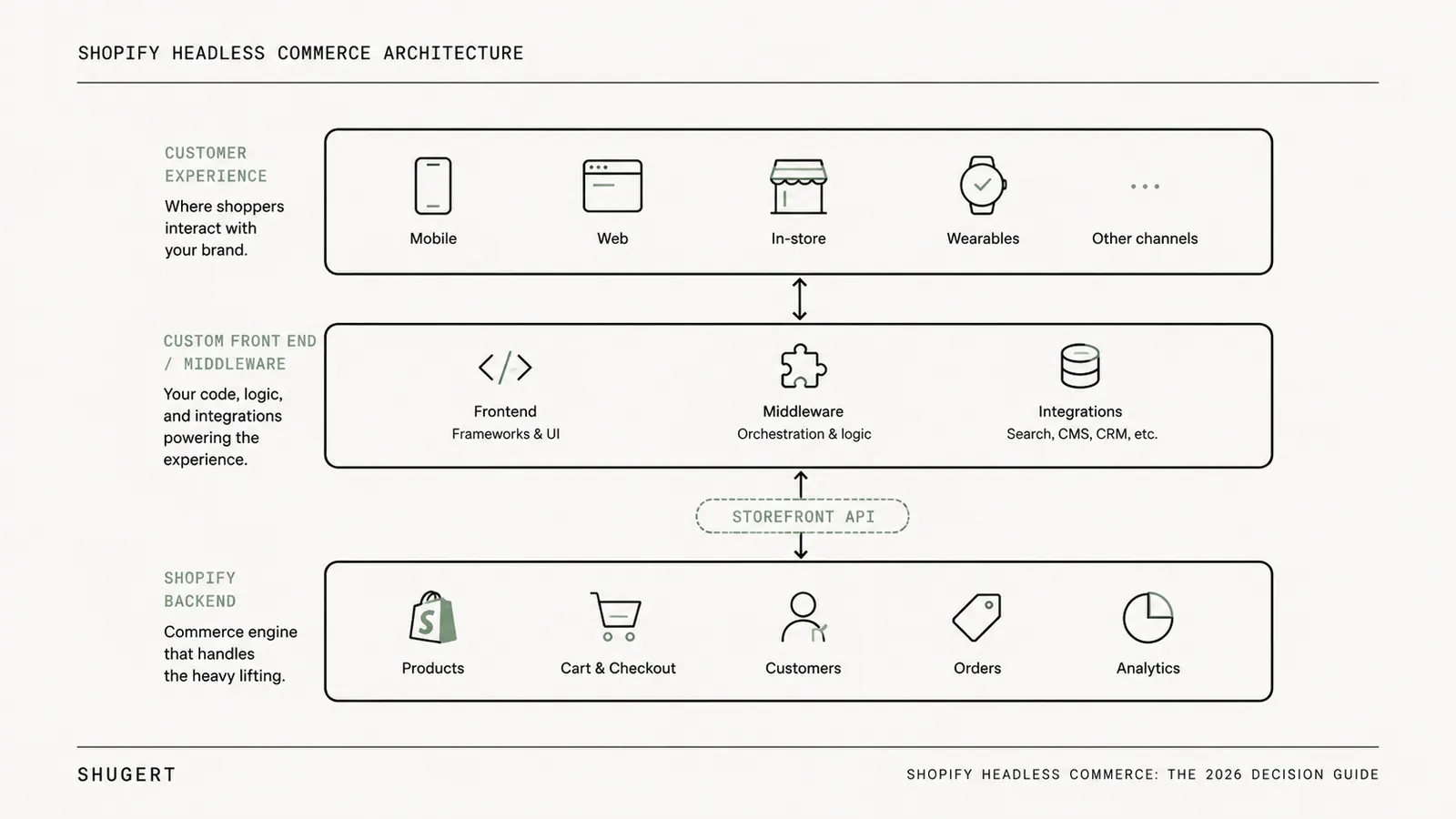
A useful analogy is a restaurant. In a traditional setup the kitchen and dining room are tightly connected. In a headless setup the kitchen still prepares the food, but multiple dining experiences can be served through a structured handoff layer. The kitchen remains the operational core; the presentation layer becomes flexible.
Shopify supports this model through the Storefront API, Hydrogen, and Oxygen, which lets merchants keep Shopify's backend while building a fully custom frontend, as described by Flatline Agency's overview of Shopify headless commerce.
What changes and what stays the same
What stays in Shopify
- Catalog and inventory: Product data remains the system of record.
- Commerce operations: Checkout, payments, and order flows still depend on Shopify.
- Admin workflows: Merchants still manage the commercial backend in Shopify Admin.
What moves out of the theme layer
- Rendering logic: Product, collection, landing, and navigation pages are generated by a separate app.
- UX behaviour: Personalisation, dynamic interfaces, advanced merchandising, and custom interactions move into React, Next.js, or Vue.
- Frontend integrations: Some app experiences stop being plug-and-play and must be integrated directly.
Teams evaluating API architecture should map how product, order, and customer data will move across systems before choosing the integration pattern. Shopify's extensibility roadmap matters here too: for brands planning custom business logic, Shopify Functions implementation guidance is relevant because backend customisations and frontend decoupling usually intersect during solution design. If the broader question is how the whole Shopify build should be structured — themes, apps, functions, and frontend together — start with the Shopify development guide and treat this article as the storefront-architecture branch of that decision.
Traditional theme versus headless storefront
| Aspect | Traditional Shopify Theme | Shopify Headless Commerce |
|---|---|---|
| Frontend layer | Built in Liquid inside Shopify | Separate custom application |
| Backend commerce | Shopify | Shopify |
| Design flexibility | Strong, but bounded by theme architecture | High control over UI and interaction patterns |
| App behavior | More plug-and-play on the storefront | Often requires custom frontend integration |
| Deployment model | Theme publishing workflow | App deployment workflow |
| Team requirement | Theme developers and ecommerce operators | Frontend engineers plus ecommerce operators |
| Best fit | Brands needing speed to market and simpler maintenance | Brands needing custom UX, multiple touchpoints, or deeper frontend control |
Practical rule: Headless does not replace Shopify. It replaces the way the storefront is built.
Teams comparing storefront models should evaluate the broader headless commerce architecture before committing to a rebuild. It is also useful to compare the trade-offs across headless commerce platforms, especially when Shopify is one component of a larger digital stack.\n\n## Shopify Headless Architecture Options in 2026
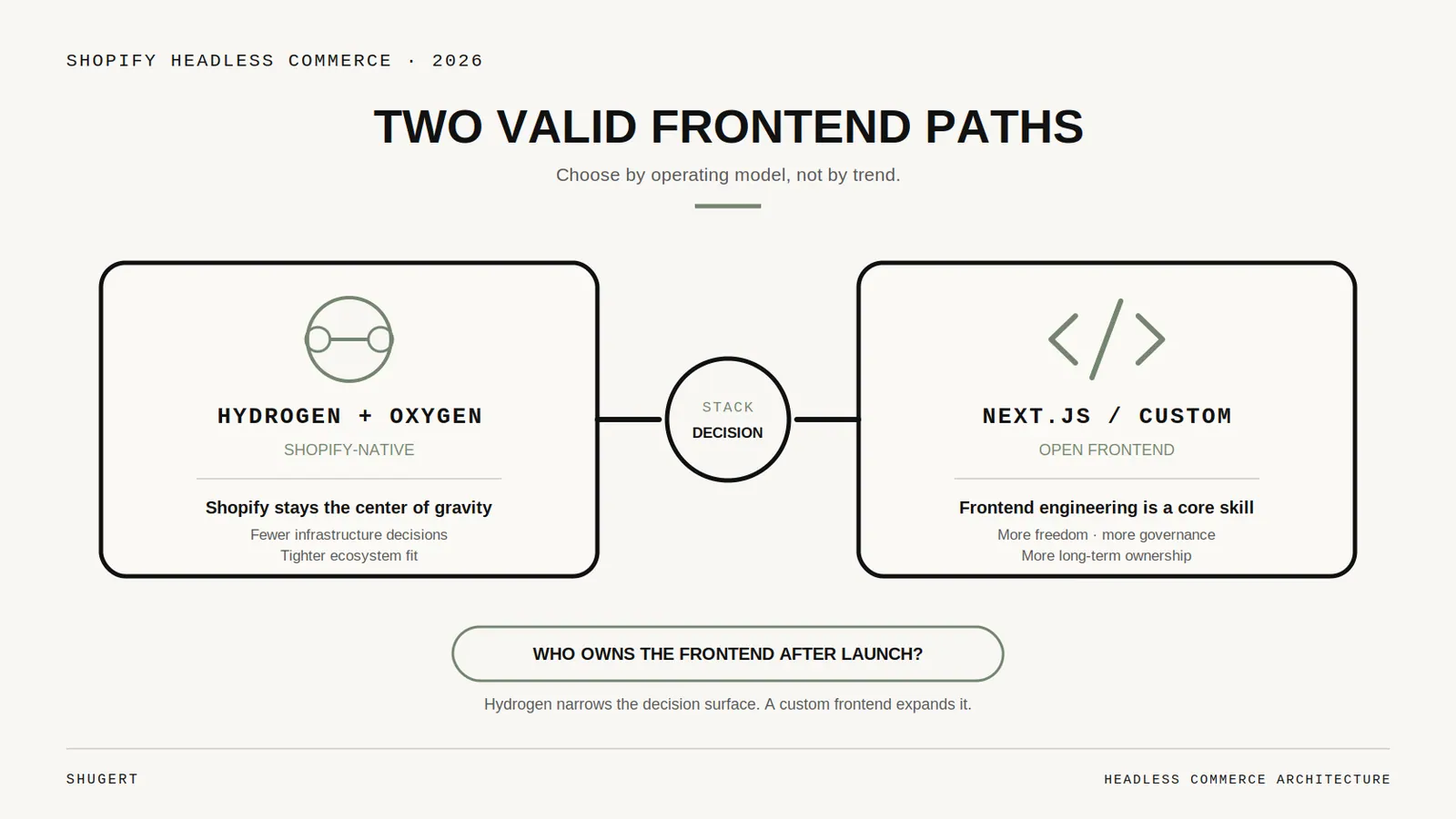
There is not one way to build a headless Shopify storefront. There are two common paths, and the right one depends less on trend and more on the team that has to live with it.
Shopify headless commerce is a decoupled frontend and backend model. The storefront can be built with React, Next.js, or Vue while Shopify continues to handle products, inventory, checkout, payments, and order management. Rendering and UI logic move out of Liquid into a separate application connected through the Storefront API, as outlined in Elogic's Shopify Plus headless architecture analysis.
Hydrogen and Oxygen
This is Shopify's native route. Hydrogen is Shopify's React-based framework for custom storefronts; Oxygen is Shopify's hosting layer for them. For commerce-first builds this path usually reduces integration friction because the stack is designed around Shopify's APIs and storefront conventions.
A team choosing Hydrogen and Oxygen is usually choosing:
- Tighter Shopify alignment: The framework is built for Shopify storefront patterns.
- Cleaner operational ownership: Hosting, deployment, and storefront behaviour sit close to Shopify's ecosystem.
- A narrower decision surface: Fewer moving parts, fewer long-term maintenance surprises.
It fits when the project is mostly about commerce UX, storefront speed, and controlled customisation. It is also the path Shopify's official documentation supports directly, so internal teams can rely on platform-native guidance during development and maintenance.
For merchants exploring how AI-driven storefront logic may overlap with headless builds, agentic storefront architecture on Shopify is part of that broader conversation.
Next.js and other custom frontends
The second path is a more open custom stack, typically Next.js on a provider such as Vercel, though other frameworks work.
This route gives teams more freedom over content-heavy routing patterns, bespoke integrations outside Shopify, broader frontend hiring compatibility, and architectural choices that do not depend on Shopify's preferred framework.
It also creates more responsibility. A custom stack can be excellent when the storefront is one part of a larger digital ecosystem — deeper CMS control, unusual localisation logic, or a frontend shared across commerce and non-commerce properties. But more freedom means more governance work: performance discipline, API design, deployment process, QA standards, and dependency management all become yours, without Shopify's opinionated path to lean on.
| Build path | Best fit |
|---|---|
| Hydrogen and Oxygen | Commerce-led brands that want custom UX inside Shopify's native ecosystem |
| Next.js or similar | Brands with broader frontend requirements and stronger engineering capacity |
The wrong stack choice rarely fails on launch day. It fails six months later when the internal team has to maintain it.
What 2026 Adds to the Evaluation
Beyond the framework choice, several things now belong in the business case explicitly rather than being discovered during QA.
- Storefront API contract: The API is versioned, rate-limited, and cached differently from Liquid. Query design, cart mutation handling, and token management become architectural decisions, not implementation details.
- Rendering and SEO: Crawlable routing, server rendering or pre-rendering, canonical logic, structured data, hreflang for regional storefronts, and pagination all need explicit owners. A client-rendered storefront with no rendering strategy is an indexation problem waiting to surface.
- Analytics and consent: Shopify's native storefront events, server-side tagging, and consent tooling behave differently once the frontend is yours. Attribution gaps discovered after launch are expensive to reconstruct.
- App parity: Storefront-facing apps — reviews, search, loyalty, subscriptions, bundles — need a named replacement path each. Backend-only apps usually travel fine.
- Observability: Error tracking, real-user monitoring, uptime checks, and API failure alerting are now your responsibility. On a theme, most of this was Shopify's.
- Deployment and QA ownership: Preview environments, release approvals, rollback, and content preview for marketing all have to be designed. So does who is on call.
- Ongoing engineering cost: Treat the storefront as a product with a permanent run rate — dependency upgrades, framework releases, API version bumps — not a project with an end date.
- Migration and cutover risk: Redirects, sitemaps, tracking parity, and a rollback plan for cart and checkout handoff decide how the first two weeks go.
None of these make headless wrong. They make the honest cost visible before approval instead of after.
The True Benefits and Business Risks
The marketing version of headless is simple: better speed, better UX, better SEO, better flexibility. The operating reality is more uneven. Some brands clearly benefit. Others trade one set of limitations for a more expensive and harder-to-manage stack. The difference is whether the business can turn architectural flexibility into measurable commercial gains.
Where headless earns its keep
First, it expands UX control. Product discovery, merchandising logic, custom landing pages, dynamic content blocks, and complex buying journeys become easier to design without bending the theme system into shapes it was not built for.
Second, it improves channel flexibility. Shopify stays the commerce backend while customised experiences run across web, mobile, campaigns, or other touchpoints — useful for stores serving different audiences, regions, or buying contexts.
Third, it raises the frontend performance ceiling. Not automatically and not by default, but potentially. A disciplined team can strip theme-era overhead and structure the storefront around tighter rendering and caching practices.
Where brands underestimate the downside
The biggest mistake is assuming the label itself creates the upside.
The most under-discussed issue is SEO execution. Headless can be configured for better SEO, but only when pre-rendering, caching, and crawlable routing are handled correctly. Shopify-specific guidance frames headless as a decision requiring careful planning rather than a default upgrade, as noted in Swanky's discussion of Shopify Plus headless and SEO considerations. Faster in theory does not mean better indexed in practice.
The main risk areas for established brands:
- SEO implementation risk: Structured data, canonical logic, crawlable navigation, and rendering strategy all need explicit ownership.
- More moving parts: A separate frontend deployment means more QA, more monitoring, and more opportunities for regressions.
- App replacement work: Theme-integrated apps often do not follow the storefront into headless without custom effort.
- Higher ongoing maintenance: The store becomes a software product, not a configured storefront.
A strong theme build can still outperform a weak headless implementation. Brands mainly fighting slow pages should review Core Web Vitals and Shopify speed optimization options before assuming a rebuild is the only way out.
Headless increases the ceiling, not the floor. A disciplined team may build something excellent. An undisciplined team may launch a slower, less indexable storefront with more maintenance burden.
There is also a leadership issue. Once a brand goes headless, routine frontend changes often move farther from merchant-friendly workflows. Marketing may gain flexibility in some areas and lose independence in others, depending on how the stack is built and whether content systems are designed properly.
The cleanest business case has three ingredients: the brand needs custom storefront behaviour, the team can support ongoing engineering work, and the expected gains justify the added operational complexity.
The Go Headless Decision Framework for Merchants
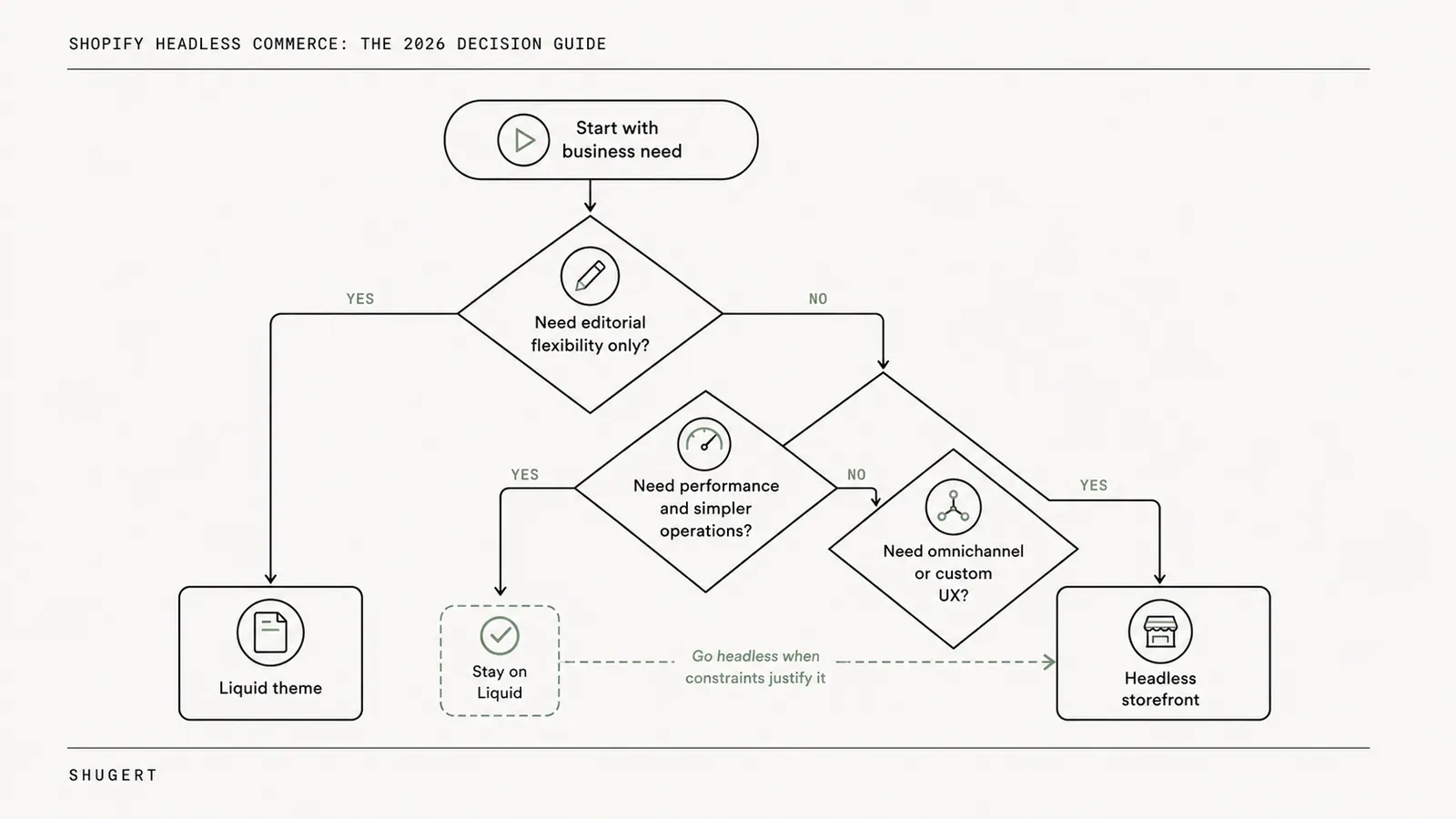
A good headless decision usually comes from subtraction.
If the core issue is a bloated theme, weak app hygiene, poor media handling, or unresolved UX friction, a rebuild distracts from the actual problem. If the business truly needs a custom storefront architecture, the decision gets much easier.
Questions leadership should answer first
-
Is the current storefront measurably limiting revenue, or only annoying the team? Design frustration alone is not enough. The stronger cases involve conversion friction, merchandising constraints, regional complexity, or multi-touchpoint delivery requirements.
-
Does the brand need a customer journey the theme layer cannot support cleanly? Advanced bundles, custom product discovery, content-rich merchandising, market-specific experiences, or a frontend shared across multiple interfaces.
-
Can the business support a custom application after launch? Headless is not a one-time build. It needs frontend ownership, QA discipline, release management, and ongoing maintenance.
-
How dependent is the store on frontend apps today? Merchant-facing guidance warns that app-heavy stores lose plug-and-play behaviour in a headless setup and may need to rebuild reviews, subscriptions, search, loyalty, or promotions in custom code — significant money, time, and effort, shifting integration debt into the frontend and data layer, according to Recharge's discussion of Shopify headless trade-offs. A merchant with a simple stack may absorb that. A merchant with deep app dependency may discover the migration budget is really an app reconstruction budget.
When the answer is probably no
- The current theme has not been properly optimised yet: Rebuilding before fixing obvious theme and asset issues is poor sequencing.
- The team relies heavily on storefront apps: Reviews, loyalty, subscriptions, merchandising, and account logic may need custom integration work.
- There is no clear engineering owner after launch: Agency-only dependence can work, but it needs an intentional retainer and process.
- The roadmap is still mostly standard ecommerce: If the storefront remains close to a conventional DTC pattern, native Shopify is usually the more efficient path.
The cleanest "no" is when the store wants headless for prestige, not for a concrete operational or commercial reason.
One practical filter helps: if leadership cannot describe exactly which customer journeys, content workflows, or channel requirements justify decoupling, the store is not ready. That does not mean it never will be. It usually means the right next move is phased preparation — simplify the app stack, clean up analytics, document feature parity, fix current performance debt, then reassess with better inputs.
A Phased Headless Migration Checklist
When the decision is yes, treat the migration as an operating change, not a design project. Most failures happen because scope expands early, app parity is underestimated, or launch prep starts too late.
Phase 1 — audit and scope control
The first phase identifies what the store actually does, not what stakeholders think it does:
- Feature parity requirements: Reviews, subscriptions, customer accounts, search, promotions, localisation, merchandising logic.
- App classification: Backend-only, storefront-dependent, or needs replacement.
- SEO assets: URL structure, metadata patterns, structured data, canonical rules, redirects, indexation dependencies.
- Performance baseline: Current pain points by template and device type.
The stack decision belongs here too, with Shopify's official documentation part of the review when comparing Hydrogen and Storefront API patterns against a custom framework approach.
Phases 2 to 4 — build, test, launch
Phase 2 is core development and integration. The team builds the frontend, connects Shopify APIs, implements content models, and recreates storefront behaviour that will not survive the move automatically.
Phase 3 is QA and validation. More than functional testing: route testing, device testing, structured data checks, crawl path review, analytics validation, and scenario testing for cart, checkout handoff, and account flows.
Phase 4 is launch and monitoring. The cutover plan covers redirect deployment, sitemap validation, performance monitoring, error tracking, and rapid rollback for critical flows.
A practical sequence:
- Audit the live store thoroughly
- Lock feature scope before development expands
- Build only the storefront experiences that justify headless
- Test SEO and app parity before launch, not after
- Monitor aggressively during the first post-launch weeks
A smooth launch rarely comes from heroic problem solving. It comes from brutal pre-launch discipline.
Measuring Headless ROI and Planning Your Next Steps
Headless should be judged like any other capital and operating decision. It either improves business performance enough to justify the added complexity, or it does not. The right KPI set goes beyond revenue:
- Core Web Vitals trends: especially LCP, INP, and CLS
- Time to interactive and perceived speed
- Conversion rate by device type
- Revenue per session by major landing page group
- Organic landing page stability after launch
- Merchandising velocity: how quickly teams can launch and modify key pages
- Frontend maintenance load: issue volume, release friction, dependency risk
Those metrics reveal whether the new architecture created an advantage or simply moved complexity into a different layer.
For many established stores the next step is not a headless build. It is an audit. The business needs to know whether theme optimisation, app rationalisation, technical SEO cleanup, or a phased architecture change will create the best return. Without that baseline, headless is a costly assumption.
Shugert helps established Shopify and Shopify Plus brands audit storefront performance, technical SEO, conversion friction, and headless readiness before major rebuilds. For teams evaluating a custom Hydrogen storefront or deciding whether a theme-first optimisation path is the better move, a structured review with Shugert is the sensible starting point — see how we work with Shopify experts.
Keep exploring this topic
Deeper references from the Shugert library and the service that turns this work into a fixed scope.
Related resources
- DevelopmentShopify Development Guide: Themes, Apps, HeadlessA practical map of where to build what on Shopify and Shopify Plus, when to use a theme section, when to write a Shopify Function, when to ship an app, and…
- Shopify PlusShopify Functions Explained: What They Do for Your StoreA technical explainer on Shopify Functions, the Wasm runtime, supported languages (Rust, JS, TS), the seven Function types, and how the architecture…
- PerformanceMoving Core Web Vitals on Shopify: LCP, INP & CLS in 2026What actually moves LCP, INP and CLS on a real Shopify store. For the broader speed framework, see our Shopify Performance Optimization Guide.
Related services
Keep reading
Shopify Inventory Sync: ERP, WMS, 3PL, and the Source of Truth
Shopify inventory sync explained for enterprise catalogs. Learn how to design ERP, WMS, and 3PL integrations that prevent race conditions and stock drift.

Shopify Theme Architecture in 2026: When Liquid Should Win Over JavaScript
JavaScript is essential for interaction, but many Shopify themes ask it to do work that Liquid and HTML can deliver earlier, more reliably and with less main-thread cost.

Why We Duplicate the Live Shopify Theme Before Every Engineering Change
A duplicate theme is a simple safety boundary: it separates implementation and QA from the storefront customers are using right now.